Some time we see, a table has hyperlink column for URL. Here I have explained to you how to achieve a column as a hyperlink. DataGridView provides DataGridViewLinkColumn control through this we create a column as a hyperlink.
The steps are given below.
Step 1: Create one window application and drag-drop DataGridView control.
Step 2: Create a table in your database for a demonstration. Below I have given my table structure. You can use this structure for creating a table.
--Create database

CREATE DATABASE DEMO


-- Use database

USER DEMO


--Create table

CREATE TABLE [dbo].[LinkDgvDemo]

(

[ID] INT IDENTITY PRIMARY KEY,

[CompanyName] VARCHAR(100) NOT NULL,

[Website] VARCHAR(100)

)


-- Inser values

INSERT INTO [dbo].[LinkDgvDemo]([CompanyName],[Website]) VALUES('Mindstick Software Ptv. Ltd.','http://mindstick.com'),('Google','http://google.com'),('Infosys','http://www.infosys.com'),('Microsoft','http://www.microsoft.com')
Step 3: Now bind your datagridview to this table ([dbo].[LinkDgvDemo]). Read the below link for binding database to datagridview.
http://www.mindstick.com/Articles/48e0cae0-5baa-41fe-946d-37938a717ddd/?Bind%20Dataset%20to%20DataGridView%20C#
Step 4: After binding database to datagridview, save and execute your application. Your application something looks as below image.

Step 5: Now we create a website column as a hyperlink (red area of the above image). Right-click on DataGridView and select the “Edit Column…” option.
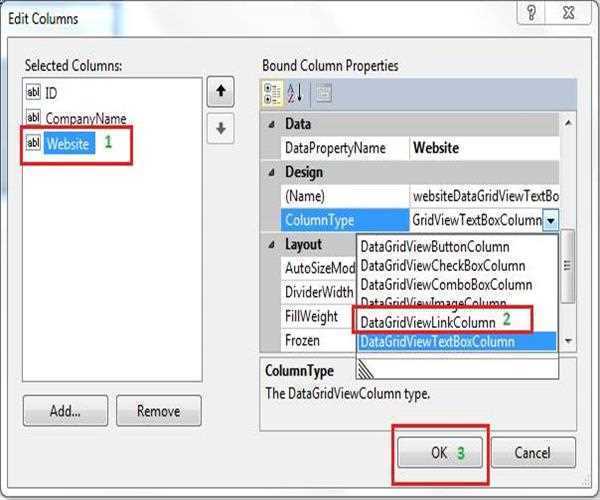
Step 6: See below the image of “Edit Column”.
(1). Select the website column.
(2). Select “DataGridViewLinkColumn” from ColumnType tag.
(3). Click button “OK”.
Step 7: Now compare the below image from step 4. All links are converted into a hyperlink.
Step 8: Now we are going to create link action for open URL on the web. Generate CellContentClick Event where we write a line of code for open link column URL on the webpage. Right-click on datagridview. Select properties. Open datagridview event list and select CellContentClick event, as below image.
Step 9: Copy below code and paste within “CellContentClick” in your windows form .cs file.
private void dgvControl_CellContentClick(object sender, DataGridViewCellEventArgs e)

        {

            string sUrl = dgvControl.Rows[e.RowIndex].Cells[2].Value.ToString();

            ProcessStartInfo sInfo = new ProcessStartInfo(sUrl);

            Process.Start(sInfo);

        }
Note: Rows[e.RowIndex].Cells[2], from the above line of code, ‘2’ are column index of hyperlink column that you change according to your datagridview column.
Run your application and see the output.


Leave a Comment
2 Comments