Cookies are small bit of text that is stored by web servers on to user machine. It contains user related information, example if we want to store record of user who had logged on to the site from specified machine then we can store cookie in that machine.
Writing Cookie
Here is the code which demonstrates how to write cookie.
Response.Cookies["username"].Value = "Mac";
Response.Cookies["userName"].Expires = DateTime.Now.AddDays(1);
First line sets the value and second line of the code above sets the expiry date of the cookie. Here it is one day, which can be modified when needed.
Reading Cookie
Here is the code which demonstrates how to read cookie.
if (Request.Cookies["username"] != null)
lblUsername.Text = "User Name: "+Request.Cookies["username"].Value;
In the code above first we are checking whether cookie exist to avoid error raised if cookie does not exist.
After checking for cookie existance we read it:
Request.Cookies["username"].Value
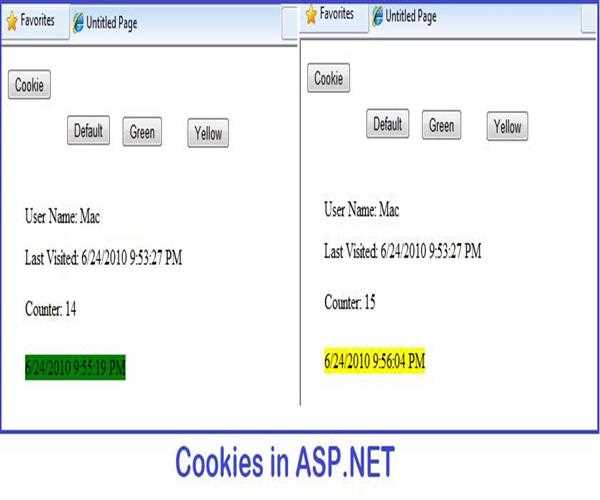
Here is an example to demonstrate the use of cookies
Design source for above screen shot
<body>
<form id="form1" runat="server">
<p>
<asp:Button ID="btnCookie0" runat="server" style="position:absolute" onclick="btnCookie_Click"
Text="Cookie" />
<asp:Button ID="btnGreen" runat="server"
style="position:absolute; top: 51px; left: 169px;" onclick="btnGreen_Click"
Text="Green" />
</p>
<asp:Button ID="btnDefault" runat="server"
style="position:absolute; top: 50px; left: 91px;" onclick="btnDefault_Click"
Text="Default" />
<p>
</p>
<p>
<asp:Label ID="lblPrevLogin" runat="server"
style="position:absolute; top: 229px; left: 33px;"></asp:Label>
<asp:Label ID="lblCounter" runat="server"
style="position:absolute; top: 185px; left: 33px;"></asp:Label>
<asp:Label ID="lblLastvisit" runat="server"
style="position:absolute; top: 147px; left: 33px;"></asp:Label>
<asp:Label ID="lblUsername" runat="server"
style="position:absolute; top: 116px; left: 33px;"></asp:Label>
</p>
<asp:Button ID="btnYellow" runat="server"
style="position:absolute; top: 52px; left: 260px;" onclick="btnYellow_Click"
Text="Yellow" />
</form>
</body>
ASP.NET code
protected void Page_Load(object sender, EventArgs e)
        {
          //creating counter to check how many times user has visited page
            int counter;
            if (Request.Cookies["counter"]== null)
                counter= 0;
            else
            {
                counter= int.Parse(Request.Cookies["counter"].Value);
            }
            counter++;
     //writing counter cookie

 Response.Cookies["counter"].Value = counter.ToString();
            Response.Cookies["counter"].Expires = DateTime.Now.AddDays(1);

//storing last visit information in cookie
            Response.Cookies["lastvisit"].Value = lblPrevLogin.Text;


//storing user name in cookie
            Response.Cookies["username"].Value= "Mac";
            Response.Cookies["userName"].Expires = DateTime.Now.AddDays(1);
          //writing last visited details
            Response.Cookies["lastvisit"].Value = DateTime.Now.ToString();
            Response.Cookies["lastvisit"].Expires = DateTime.Now.AddDays(1);

          //checking for counter cookie and displaying the counter in label
            if (Request.Cookies["counter"] != null)
                lblCounter.Text = "Counter: " +
Request.Cookies["counter"].Value;

       //checking lastvisit cookie and displaying it in label
            if (Request.Cookies["lastvisit"] != null)
                lblPrevLogin.Text =  Request.Cookies["lastvisit"].Value;
        //checking for color cookie set by the user and changing the backcolor of //lableaccordingly.
if (Request.Cookies["color"] != null)
            {
                if (Request.Cookies["color"].Value == "Red")
                    lblPrevLogin.BackColor = System.Drawing.Color.Red;
                else if (Request.Cookies["color"].Value == "Green")
                    lblPrevLogin.BackColor = System.Drawing.Color.Green;
                else if (Request.Cookies["color"].Value == "Yellow")
                    lblPrevLogin.BackColor = System.Drawing.Color.Yellow;
            }
        }

        protected void btnCookie_Click(object sender, EventArgs e)
        {
           //displaying user nameand lastvisit information of user
            if (Request.Cookies["username"] != null)
                lblUsername.Text = "User Name: "+Request.Cookies["username"].Value;
            if (Request.Cookies["lastvisit"] != null)
                lblLastvisit.Text = "Last Visited: "+Request.Cookies["lastvisit"].Value;
        }
//modifing color cookie and and changing backcolor of label accorgind to //button click
 protected void btnDefault_Click(object sender, EventArgs e)
        {

            Response.Cookies["color"].Value = "Red";
            Response.Cookies["color"].Expires = DateTime.Now.AddDays(1);
            lblPrevLogin.BackColor= System.Drawing.Color.Red;
        }
 protected void btnGreen_Click(object sender, EventArgs e)
        {
            Response.Cookies["color"].Value = "Green";
            Response.Cookies["color"].Expires = DateTime.Now.AddDays(1);
            lblPrevLogin.BackColor= System.Drawing.Color.Green;
        }
protected void btnYellow_Click(object sender, EventArgs e)
        {
            Response.Cookies["color"].Value = "Yellow";
            Response.Cookies["color"].Expires = DateTime.Now.AddDays(1);
            lblPrevLogin.BackColor= System.Drawing.Color.Yellow;
        }


Leave a Comment
3 Comments