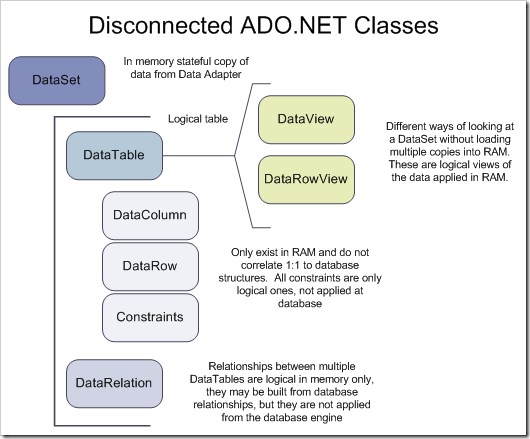
The DataSet class in ADO.NET is a disconnected, in-memory representation of data. It can store multiple
DataTable objects, along with relationships, constraints, and schema information. Unlike
DataReader, DataSet works without requiring an active database connection after retrieving the data.
Namespace:
using System.Data;
Key Features of DataSet
- Stores multiple tables in memory (
DataTableobjects). - Works in a disconnected manner, allowing data manipulation without an active connection.
- Maintains relationships between tables using
DataRelation. - Supports constraints such as primary keys and foreign keys.
- Enables data operations like filtering, sorting, and searching.

Creating a DataSet and Adding Tables
using System;
using System.Data;

class Program
{
    static void Main()
    {
        // Create a DataSet
        DataSet ds = new DataSet("CompanyDataSet");

        // Create a DataTable
        DataTable dt = new DataTable("Employees");

        // Define columns
        dt.Columns.Add("ID", typeof(int));
        dt.Columns.Add("Name", typeof(string));
        dt.Columns.Add("Age", typeof(int));

        // Add rows
        dt.Rows.Add(1, "Alice", 25);
        dt.Rows.Add(2, "Bob", 30);
        dt.Rows.Add(3, "Charlie", 22);

        // Add DataTable to DataSet
        ds.Tables.Add(dt);

        // Display data from DataSet
        foreach (DataRow row in ds.Tables["Employees"].Rows)
        {
            Console.WriteLine($"ID: {row["ID"]}, Name: {row["Name"]}, Age: {row["Age"]}");
        }
    }
}
Loading Data from a Database (SqlDataAdapter)
We can populate a DataSet from a database using SqlDataAdapter.
using System;
using System.Data;
using System.Data.SqlClient;

class Program
{
    static void Main()
    {
        string connectionString = "Server=your_server;Database=your_db;Integrated Security=True;";
        DataSet ds = new DataSet();
        using (SqlConnection conn = new SqlConnection(connectionString))
        {
            conn.Open();

            // Define SQL query
            string query = "SELECT ID, Name, Age FROM Employees";

            // Fill DataSet
            SqlDataAdapter adapter = new SqlDataAdapter(query, conn);
            adapter.Fill(ds, "Employees"); // Fills DataSet with "Employees" table
            conn.Close(); // Close connection (Disconnected Mode)
        }
        // Display retrieved data
        foreach (DataRow row in ds.Tables["Employees"].Rows)
        {
            Console.WriteLine($"ID: {row["ID"]}, Name: {row["Name"]}, Age: {row["Age"]}");
        }
    }
}
Proof of Disconnection: After fetching the data, the connection is closed, but we can still work with the
DataSet.
Searching and Filtering Data
Searching (Select Method)
DataRow[] result = ds.Tables["Employees"].Select("Age > 25");
foreach (DataRow row in result)
{
    Console.WriteLine($"Filtered Employee: {row["Name"]} ({row["Age"]})");
}
Sorting Data
Although DataSet does not support direct sorting, we can use
DataView:
DataView dv = new DataView(ds.Tables["Employees"]);
dv.Sort = "Age DESC";

foreach (DataRowView row in dv)
{
    Console.WriteLine($"{row["Name"]} - {row["Age"]}");
}
Updating the Database from a DataSet
Since DataSet is disconnected, changes must be updated back to the database using
SqlDataAdapter.
using System.Data.SqlClient;

// Modify data
ds.Tables["Employees"].Rows[0]["Age"] = 35;  // Update age for first row

// Reconnect and update the database
using (SqlConnection conn = new SqlConnection(connectionString))
{
    SqlDataAdapter adapter = new SqlDataAdapter("SELECT ID, Name, Age FROM Employees", conn);
    SqlCommandBuilder builder = new SqlCommandBuilder(adapter); // Auto-generate SQL commands

    adapter.Update(ds, "Employees"); // Apply changes to DB
    Console.WriteLine("Database Updated!");
}
Adding Relationships Between Tables
A DataSet can store multiple related tables. We can define
parent-child relationships using DataRelation.
DataTable employees = new DataTable("Employees");
employees.Columns.Add("ID", typeof(int));
employees.Columns.Add("Name", typeof(string));

DataTable departments = new DataTable("Departments");
departments.Columns.Add("DeptID", typeof(int));
departments.Columns.Add("DeptName", typeof(string));
departments.Columns.Add("EmpID", typeof(int)); // Foreign Key

// Add tables to DataSet
ds.Tables.Add(employees);
ds.Tables.Add(departments);

// Define relation (1 Employee → Many Departments)
DataRelation relation = new DataRelation(
    "EmployeeDepartment",
    ds.Tables["Employees"].Columns["ID"],  // Parent
    ds.Tables["Departments"].Columns["EmpID"]  // Child
);

ds.Relations.Add(relation);
Console.WriteLine("Relationship Added Successfully!");
Converting DataSet to
XML
The DataSet supports exporting data to XML format.
ds.WriteXml("CompanyData.xml");  // Save to XML file
Console.WriteLine("DataSet saved as XML!");
To load from XML:
ds.ReadXml("CompanyData.xml");
When to Use DataSet?
- Multiple Tables: When working with multiple tables and relationships.
- Disconnected Mode: When you don’t need a live database connection.
- Batch Processing: When you need to update multiple rows at once before saving to the database.
- XML Support: When you need to save/load data in XML format.
Summary
| Feature | DataSet (Disconnected) |
DataReader (Connected) |
|---|---|---|
| Stores Multiple Tables? | Yes | No |
| Works Without DB Connection? | Yes | No |
| Supports Filtering & Sorting? | Yes (via DataView) |
No |
| Best for Large Data? | Yes (Batch Operations) | No (Real-time Only) |
| Supports XML? | Yes (WriteXml()) |
No |


Leave a Comment