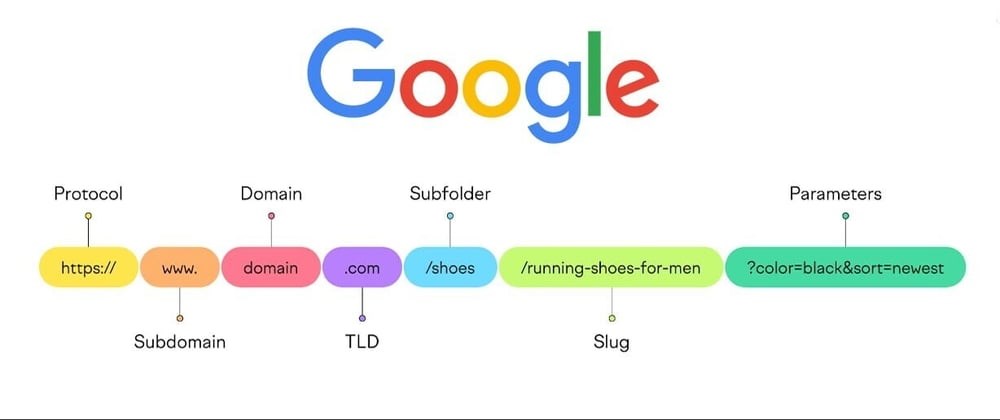
To create shorter, user-friendly, or "slugged" URLs with Latin-based names, you can use URL slugging. This process typically involves converting strings (like page titles or names) into lowercase, replacing spaces and special characters with hyphens or other valid URL characters, and ensuring the resulting URL is unique and human-readable.
Example: Generating Latin Name Slugs for URLs in ASP.NET Core
Create a Utility Method for Slug Generation
A utility method can convert any string into a slug-friendly format.
using System.Text;
using System.Text.RegularExpressions;
public static class UrlSlugger
{
    public static string GenerateSlug(string input)
    {
        if (string.IsNullOrEmpty(input))
            return string.Empty;

        // Convert to lowercase
        input = input.ToLowerInvariant();

        // Remove diacritics (accents) from Latin characters
        input = RemoveDiacritics(input);

        // Replace spaces and invalid characters with hyphens
        input = Regex.Replace(input, @"[^a-z0-9\s-]", ""); // Allow only alphanumeric, spaces, and hyphens
        input = Regex.Replace(input, @"\s+", "-").Trim();  // Replace spaces with hyphens
        input = Regex.Replace(input, @"-+", "-");         // Replace multiple hyphens with a single one

        return input;
    }

    private static string RemoveDiacritics(string text)
    {
        var normalizedString = text.Normalize(NormalizationForm.FormD);
        var stringBuilder = new StringBuilder();

        foreach (var c in normalizedString)
        {
            var unicodeCategory = System.Globalization.CharUnicodeInfo.GetUnicodeCategory(c);
            if (unicodeCategory != System.Globalization.UnicodeCategory.NonSpacingMark)
            {
                stringBuilder.Append(c);
            }
        }

        return stringBuilder.ToString().Normalize(NormalizationForm.FormC);
    }
}
Using the Slug Generator in Your Application
You can use this slug generator for URLs when defining routes or generating links dynamically.
Example in Controller:
public IActionResult GenerateSluggedUrl(string title)
{
    string slug = UrlSlugger.GenerateSlug(title);
    return Ok($"Generated slug: {slug}");
}
Example Usage:
For a title like "Éxample Title for URL!", the slug will be:
example-title-for-url
Testing Slugged URLs
Example URLs:/page/example-title-for-url/page/sample-page-title
Result:
You can use the slug parameter in the controller to load content based on the slug (e.g., querying the database for matching pages).
Additional Tips
- Ensure slugs are unique for your content. Add a database field to store slugs and validate uniqueness.
- Store slugs in your database alongside the corresponding entity (e.g., articles, pages, or products).
- Use slugs in links to improve SEO and user experience.


Leave a Comment