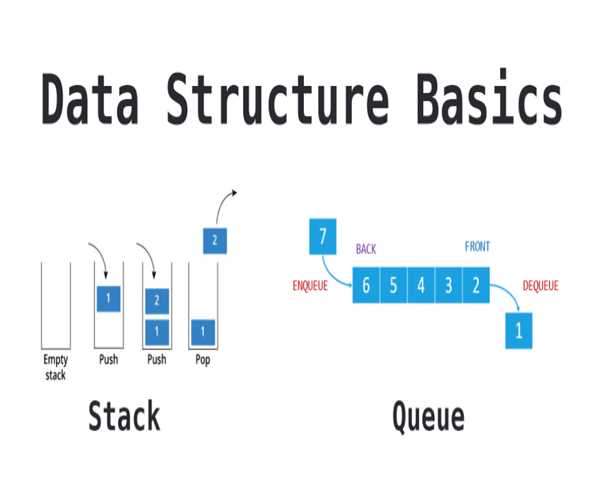
Implementing a stack and a queue in JavaScript using arrays is straightforward due to the built-in array methods that align well with the principles of these data structures.
Stack
A stack is a Last In, First Out (LIFO) data structure. The most recently added element is the first one to be removed. You can implement a stack using an array with the following operations:

- push: Add an element to the top of the stack.
- pop: Remove the element from the top of the stack.
- peek: Get the element at the top of the stack without removing it.
- isEmpty: Check if the stack is empty.
- size: Get the number of elements in the stack.
class Stack {
    constructor() {
        // Initialize an empty array to store the elements of the stack
        this.items = [];
    }

    // Return the number of elements in the stack
    size() {
        return this.items.length;
    }

    // Check if the stack is empty
    isEmpty() {
        return this.size() === 0;
    }

    // Return the element at the top of the stack without removing it
    peek() {
        if (this.isEmpty()) {
            return "Stack is empty";
        }
        return this.items[this.size() - 1];
    }

    // Add an element to the top of the stack
    push(element) {
        this.items.push(element);
    }

    // Remove and return the element from the top of the stack
    pop() {
        if (this.isEmpty()) {
            return "Stack is empty";
        }
        return this.items.pop();
    }

    // Print the elements of the stack
    print() {
        console.log(this.items.toString());
    }
}

// Example usage:
const stack = new Stack();
stack.push(10); // Add 10 to the stack
stack.push(20); // Add 20 to the stack
stack.push(30); // Add 30 to the stack
console.log(stack.pop());  // Remove and return the top element (30)
console.log(stack.peek()); // Return the top element without removing it (20)
console.log(stack.isEmpty()); // Check if the stack is empty (false)
console.log(stack.size()); // Get the number of elements in the stack (2)
stack.print(); // Print the elements of the stack (10,20)
Queue
A queue is a First In, First Out (FIFO) data structure. The first element added is the first one to be removed. You can implement a queue using an array with the following operations:
- enqueue: Add an element to the end of the queue.
- dequeue: Remove the element from the front of the queue.
- front: Get the element at the front of the queue without removing it.
- isEmpty: Check if the queue is empty.
- size: Get the number of elements in the queue.
class Queue {
    constructor() {
        // Initialize an empty array to store the elements of the queue
        this.items = [];
    }

    // Return the number of elements in the queue
    size() {
        return this.items.length;
    }

    // Check if the queue is empty
    isEmpty() {
        return this.size() === 0;
    }

    // Return the element at the front of the queue without removing it
    front() {
        if (this.isEmpty()) {
            return "Queue is empty";
        }
        return this.items[0];
    }

    // Add an element to the end of the queue
    enqueue(element) {
        this.items.push(element);
    }

    // Remove and return the element from the front of the queue
    dequeue() {
        if (this.isEmpty()) {
            return "Queue is empty";
        }
        return this.items.shift();
    }

    // Print the elements of the queue
    print() {
        console.log(this.items.toString());
    }
}

// Example usage:
const queue = new Queue();
queue.enqueue(10); // Add 10 to the queue
queue.enqueue(20); // Add 20 to the queue
queue.enqueue(30); // Add 30 to the queue
console.log(queue.dequeue());  // Remove and return the front element (10)
console.log(queue.front()); // Return the front element without removing it (20)
console.log(queue.isEmpty()); // Check if the queue is empty (false)
console.log(queue.size()); // Get the number of elements in the queue (2)
queue.print(); // Print the elements of the queue (20,30)
Note.
Stack: Use push and pop for LIFO behavior.
Queue: Use push and shift for FIFO behavior.
Read also:
What is the difference between null and undefined in JavaScript?
What is the purpose of async and await in JavaScript? Provide an example.


Leave a Comment