A HashMap in Java is a part of the Java Collections Framework and is used to store key-value pairs. It provides constant-time performance for basic operations like
adding, removing, and retrieving elements,
assuming the hash function disperses the elements properly among the buckets.
HashMap is a class that implements the Map interface, storing key-value pairs. It allows one null key and multiple null values.
Hashmap is an unordered collection which is data is not stored in dictionary format.
It allows null values and the null key and it is not thread-safe by default.
Internal Structure
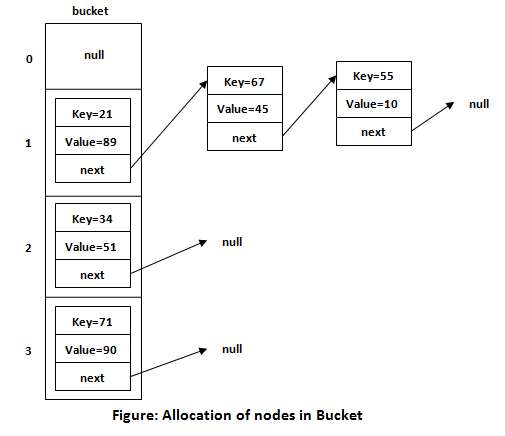
HashMap works internally using an array of Node objects, where each
Node represents a key-value pair. Each Node contains four fields:
int hash: The hash code of the key.K key: The key.V value: The value.Node<K,V> next: The reference to the next node in the same bucket (linked list).
Hashing and Index Calculation
Hashing:
- When a key-value pair is added to the
HashMap, the key's hash code is calculated using thehashCode()method. - This hash code is then transformed into a bucket index (array index) using the internal hash function to reduce hash collisions.
Index Calculation: The index in the array is calculated using the formula:
index = (n - 1) & hash, where n is the size of the array. The
& operator performs a bitwise AND operation to ensure the index is within the array bounds.
Handling Collisions
- Separate Chaining:
HashMaphandles collisions using a technique called separate chaining. If two keys hash to the same bucket index, their entries are stored in a linked list (or a balanced tree, depending on the number of entries). - Treeification: When the number of elements in a bucket exceeds a certain threshold (default is 8), the linked list is transformed into a balanced tree to improve performance for large buckets.
Rehashing
When the load factor (ratio of the number of elements to the size of the array) exceeds a certain threshold (default is 0.75), the
HashMap dynamically increases the size of the array (usually doubling it) and rehashes all the existing entries into the new array. This ensures that the
HashMap maintains efficient performance as it grows.
Example :
import java.util.HashMap;
import java.util.Map;

public class HashMapExample {
    public static void main(String[] args) {
        Map<String, Integer> map = new HashMap<>();

        // Adding elements to the HashMap
        map.put("one", 1);
        map.put("two", 2);
        map.put("three", 3);

        // Accessing elements
        System.out.println("Value for key 'one': " + map.get("one"));
        System.out.println("Value for key 'two': " + map.get("two"));

        // Iterating over the HashMap
        for (Map.Entry<String, Integer> entry : map.entrySet()) {
            System.out.println("Key: " + entry.getKey() + ", Value: " + entry.getValue());
        }

        // Removing an element
        map.remove("three");
        System.out.println("Map after removing key 'three': " + map);
    }
}
Output:
Value for key 'one': 1
Value for key 'two': 2
Key: one, Value: 1
Key: two, Value: 2
Key: three, Value: 3
Map after removing key 'three': {one=1, two=2}
Read more
What is the best way to iterate on hashmap in Java
Differences between HashMap and Hashtable?


Leave a Comment