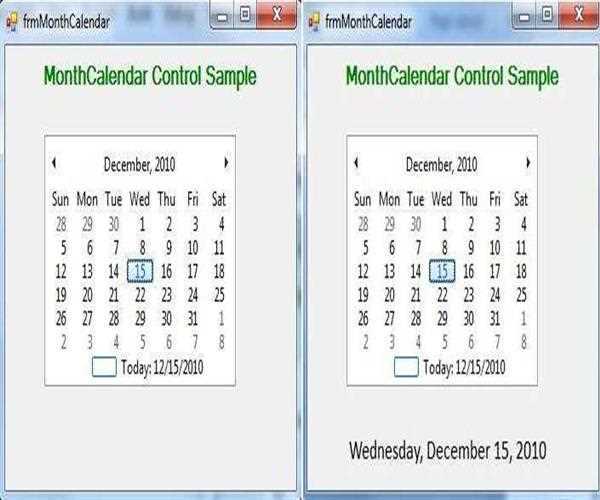
A MonthCalendar control allows to selecting a date at the run time.
How to use MonthCalendar Control
Drag and drop MonthCalendar Control and Label from the toolbox on the window Form.

Code:
Write code in DateChanged event
Double click on DateChanged event and assign the value of month date in label
private void monthCalendar1_DateChanged(object sender,  DateRangeEventArgs e)
{
            //show the selected in Label
         label1.Text = monthCalendar1.SelectionStart.ToLongDateString();
   }
Properties:
SelectionRange - Determines the selected range of dates for a month calendar control.
SelectionStart - Determines the start date of the selected range of dates.
ToLongtDateString(); will show date in long format
Run the project
When you select the date in the calendar then the DateChanged event will fire and the selected date will show in the Label.
Properties of MonthCalendar Control
FirstDayOfWeek: The Default value is Sunday. It means week starts with Sunday as the first day and Saturday as last. You can set the first day of the week depending upon your choice by selecting from the predefined list with this property.
ShowTodayCircle: The Default value is set to true which displays a circle on the current date. The Setting, it to False will make the circle disappear.
ShowWeekNumber: The Default is False. Because setting it to True will display the week number of the current week in the 52 week year. It will be displayed towards the left side of the control.
ShowToday: The Default value is set to true which displays the current date at the bottom of the Calendar. When set it to False will hide the current date.
Example:
private void frmMonthCalendar_Load(object sender,  EventArgs e)
{
            //Hide current date in side calendar
            monthCalendar1.ShowToday = false;
}
You should read this Article - Using ReportViewer in WinForms C#


Leave a Comment
1 Comments