Where A Crystal Reports is the standard reporting tool for Visual Studio .NET. It's used to display data of presentation quality.
Steps to generate a report using CrystalReportViewer
Drag and drop CrystalReportViewer

Add DataSet
Click add
Click on server explorer
Drag and Drop table
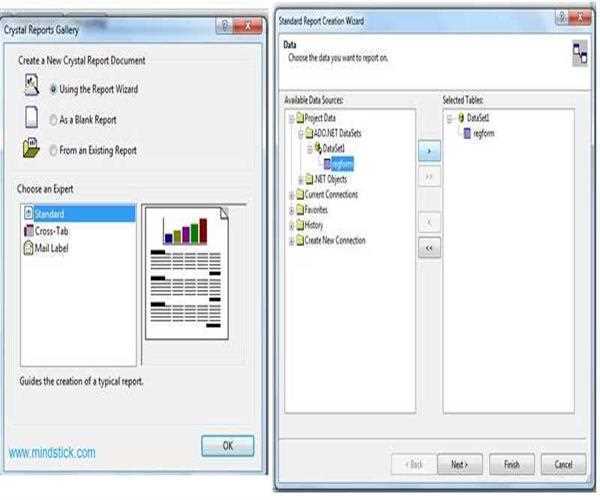
Now add CrystalReport
Click add
Click Ok
Expand create ProjectData
Expand AD.NET Datasets and select table and then click next
Click highlighted array to select field and click next
Click next
Click next
Click finish
protected void Page_Load(object sender, EventArgs e)
{
//To instantiate a ReportBuilder, you must provide the ReportDocument to be built.
ReportDocument ReportDocument1 = new ReportDocument();
//Loading Crystal Report to Report Object
reportDocumentObj.Load(Server.MapPath("~/CrystalReport.rpt"));
//Creating instance of Data Table created earlier.
DataSet1.regformDataTable dt = new DataSet1.regformDataTable();
DataSet1TableAdapters.regformTableAdapter da = new DataSet1TableAdapters.regformTableAdapter();
//Filling data table
 da.Fill(dt);
//Setting Data Source of Report Document.
 ReportDocument1.SetDataSource((DataTable)dt);
//Assigning object of ReportDocument to Crystal Report as ReportSource
 CrystalReportViewer1.ReportSource = ReportDocument1;
}
// Use namespace CrystalDecisions.CrystalReports.Engine;
Now Report is generated.
Read also this Article - Using ReportViewer in WinForms C#


Leave a Comment