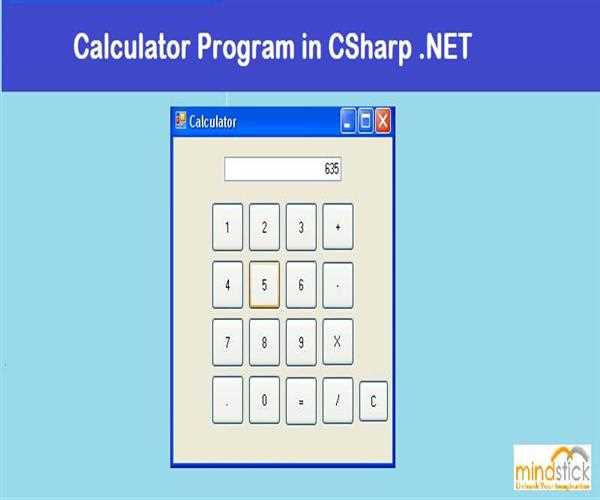
This calculator can perform all the basic mathematical operations, like add, subtract, multiply and divide. It has a text box with displays input and output.
Form detail

Form
Objects name
Form: frmCalc
Text Box: txtDisp
Digits buttons: btn0, btn1,………., btn9
Add button: btnAdd
Subtract button: btnSub
Multiply button: btnMul
Divide button: btnDiv
Decimal button: btnPnt
Equal button: btnEql
Clear button: btnClear
Form Code with Explanation
        double val; //it’ll store the result of the operations performed
        public char prevOperator; //it’ll store the recent used operator


       //The function below will display the value in the text box according to the digits button pressed.
        private void display(string sNum)
        {

        //checking whether the last used operator was ‘=’ or not. If it is equal then
        //text box will be cleared for the new values to be displayed.

            if (prevOperator == '=')
            {
                prevOperator = ' ';
                txtDisp.Text = "";
            }

        //checking whether the text box is empty. If text box is empty then value of
        //pressed button will be displayed directly otherwise button text will be
        //concatinated with the text box value

         if(txtDisp.Text=="")
                txtDisp.Text = sNum;
            else
                txtDisp.Text=txtDisp.Text + sNum;
        }

 // initilizing the value of ‘val’ and ‘prevOperator’ at form load event.

        private void Form1_Load(object sender, EventArgs e)
        {
            val = 0.0;
            prevOperator = ' ';
        }

        private void btn_Click(object sender, EventArgs e)
        {

        //calling display function and passing the text of button clicked as string

            display(((Button)sender).Text);
        }

        private void btnAdd_Click(object sender, EventArgs e)
        {
        //setting the prevOperator to ‘+’ and adding the value of text box
        //to value of ‘val’
            prevOperator = '+';
            val = val + Convert.ToDouble(txtDisp.Text);
            txtDisp.Text = "";
        }

        private void btnEql_Click(object sender, EventArgs e)
        {
            if (prevOperator == '+')
                val = val + Convert.ToDouble(txtDisp.Text);
            else if (prevOperator == '-')
                val = val - Convert.ToDouble(txtDisp.Text);
            else if (prevOperator == '*')
                val = val * Convert.ToDouble(txtDisp.Text);
            else if (prevOperator == '/')
            {
                try
                {
                    val = val / Convert.ToDouble(txtDisp.Text);
                }
                catch (Exception ex)
                {
                    MessageBox.Show(ex.Message);
                }
            }
            txtDisp.Text = Convert.ToString(val);
            prevOperator = '=';
            val = 0.0;
        }

        private void btnSub_Click(object sender, EventArgs e)
        {
        //setting the prevOperator to ‘-’ and subtracting the value of text box
        //from ‘val’

            prevOperator = '-';
            if (val == 0)
                val = Convert.ToDouble(txtDisp.Text);
            else
                val = val - Convert.ToDouble(txtDisp.Text);
            txtDisp.Text = "";
        }

        private void btnMul_Click(object sender, EventArgs e)
        {
         //setting the prevOperator to ‘*’ and adding the value of text box
         //to value of ‘val’

            prevOperator = '*';
            if (val == 0)
                val = Convert.ToDouble(txtDisp.Text);
            else
                val = val * Convert.ToDouble(txtDisp.Text);
            txtDisp.Text = "";
        }

        private void btnDiv_Click(object sender, EventArgs e)
        {
         //setting the prevOperator to ‘/’ and adding the value of text box
        //to value of ‘val’

            prevOperator = '/';
            if (val == 0)
                val = Convert.ToDouble(txtDisp.Text);
            else
                val = val / Convert.ToDouble(txtDisp.Text);
            txtDisp.Text = "";
        }

        private void btnPnt_Click(object sender, EventArgs e)
        {
            if (prevOperator == '=')
            {
                prevOperator = ' ';
                txtDisp.Text = "";
            }

          //checking whether ‘.’ Is present in text box or not if present then no
          //action will be taken as there can be only one decimal point in a number
          //and if not then decimal will be added.

            if (!txtDisp.Text.Contains('.'))
            {

         //checking whether text box contains any number or not. If not the ‘0.’
        //Displayed otherwise decimal will be added to the number present
        //in the text box.
                if (txtDisp.Text != "")
                    txtDisp.Text = txtDisp.Text + ".";
                else
                    txtDisp.Text = "0.";
            }
        }

        private void btnClear_Click(object sender, EventArgs e)
        {
      //clearing the tex box.
            txtDisp.Text = "";}


Leave a Comment
3 Comments