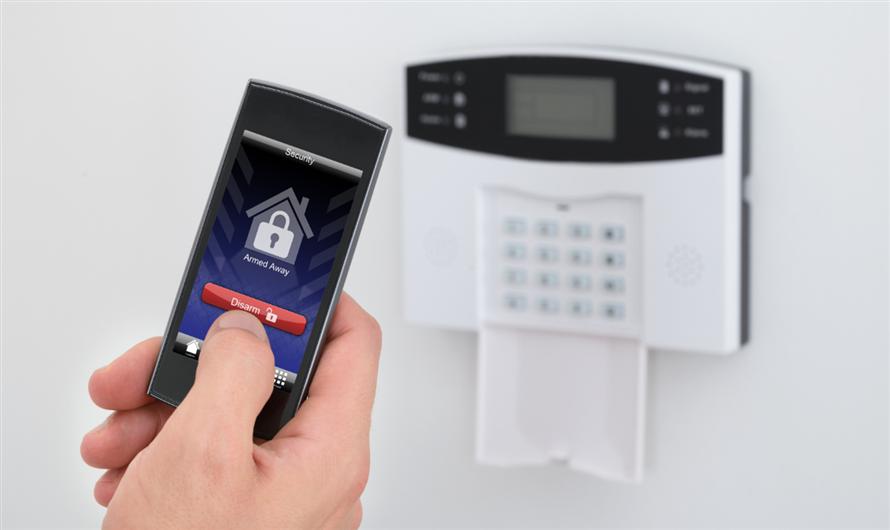
Protecting a commercial property is about more than locking the front door. Managing access for employees, contractors, vendors, and visitors can quickly become difficult when you rely on traditional keys. Lost or copied keys can create security risks, increase costs, and make it harder to control who enters your building.
A modern access control system offers a smarter way to improve commercial property protection with secure, flexible, and easy-to-manage entry. Combined with smart door access, businesses can track access, update permissions instantly, and create a safer environment while keeping daily operations running smoothly.
Understanding Smart Locks for Commercial Property Protection
Traditional keys served businesses for a long time, but modern buildings move at a different pace. Teams change. Tenants rotate. Vendors need temporary access. That’s where smart locks start to make practical sense.
What Smart Locks Actually Do
For anyone comparing smart locks for commercial properties, the real advantage is control. Instead of handing out copied keys or replacing lock cylinders, you can give, pause, or remove access from a central dashboard connected to commercial building access control systems.
Smart Locks vs. Mechanical Locks
A mechanical lock has one basic job: to stay locked or open when the right key turns. Strong commercial smart lock security goes further. It can tell you who came in, when they entered, and whether a door was forced, propped open, or left unsecured.
Why Businesses Are Making the Switch
For offices, clinics, retail shops, and shared buildings, smart locks for businesses help reduce those “wait, who has a key?” moments. They tighten access without making everyday movement feel clunky. And once you see that shift, the next question is obvious: what does it actually improve day to day?
Benefits of Smart Locks for Commercial Properties That Drive Business Value
Once you move beyond metal keys, the daily benefits become easier to spot. Security improves, yes, but so does the way your team handles access, turnover, and routine operations.
Better Access Control
One of the clearest benefits of smart locks is flexible access. You can match permissions to real schedules instead of guessing. A cleaner may only need entry after closing. A contractor might need access for one afternoon. A manager may need broader rights across several doors.
Less Risk From Lost Keys
Lost keys create that awful mix of cost, delay, and uncertainty. Who found it? Was it copied? Is the back door still safe? With digital access, a manager can remove a credential quickly instead of rekeying half the building.
Useful Visibility for Managers
Many businesses connect smart locks with commercial building access control systems, which lets managers review access activity from one place. That visibility is especially useful in multi-tenant properties, where people move in, move out, and change roles often.
| Feature | Traditional Key | Smart Lock |
| Access changes | Requires new keys or hardware | Updated from a dashboard |
| Entry records | Usually none | Time-stamped activity logs |
| Lost credential response | Rekeying may be needed | Access can be removed quickly |
| Tenant or staff turnover | Manual and slow | Easier to update |
These gains depend on choosing the right tools, not just the shiniest lock on the door. So, let’s look at the features that matter most.
Essential Features of Commercial Smart Lock Security Solutions
Now we get under the hood a bit. A business-grade smart lock setup should do more than let someone unlock a door from a phone. Convenience is nice. Control is better.
Strong Identity Checks
PINs, cards, mobile credentials, biometrics, and multi-factor access can all help confirm that the right person is entering. This becomes even more important when your building holds sensitive files, equipment, inventory, medical records, or tenant-only spaces.
Alerts and Audit Trails
Tamper alerts, door-held-open notices, and audit trails help your team respond before a small issue turns into a serious one. When these tools are part of commercial building access control systems, alerts can also connect with alarms, surveillance cameras, and visitor management records for a more complete security picture.
Once those features are clear, the next step is figuring out how to roll out the right setup without creating confusion.
Key Strategies for Implementing Smart Locks for Businesses
With the main capabilities in mind, implementation becomes the make-or-break stage. A rushed installation can frustrate staff and leave gaps behind. A thoughtful rollout, on the other hand, makes the system easier to trust.
Start With a Security Review
Before you buy anything, look closely at your doors, users, schedules, and weak spots. A retail back entrance does not have the same risk profile as a hospital supply room, warehouse loading dock, or shared office floor. Sounds obvious, but it’s where many projects go sideways.
Match Locks to the Environment
A small office may only need mobile access, simple permissions, and clean activity logs. A hotel, school, or medical office may need stronger controls, backup options, and detailed role-based permissions. The best setup is the one that fits the actual building, not a generic checklist.
Train Staff Early
Even an excellent system can become messy if people don’t understand it. Clear rules for granting access, removing access, and reporting problems help smart locks for businesses stay organized. Nobody wants a security tool that turns into an admin nightmare.
When the rollout is planned carefully, the system becomes easier to manage, easier to expand, and easier for people to use correctly.
Trends, Challenges, and Future-Ready Protection
A good smart lock rollout can deliver quick wins, but the technology keeps evolving. Staying current helps your property meet new risks, new habits, and new tenant expectations.
New Access Trends
Mobile badge entry, touchless access, and wallet-based credentials are becoming more common. Some systems also use behavior alerts to flag unusual access patterns. Of course, human review still matters. Software can spot a pattern, but people understand context.
Common Adoption Concerns
Cybersecurity, battery failure, and compliance are legitimate concerns. The answer is layered protection: encrypted credentials, backup power plans, regular software updates, and careful admin controls. In other words, don’t rely on one safeguard when several can work together.
Planning for Growth
Strong commercial property protection should grow with your building instead of forcing a full rebuild later. That’s why many owners choose smart locks that work with commercial building access control systems across more than one location.
Long-term planning also means thinking about audits, user changes, software updates, and future doors before problems show up.
Maximizing ROI From Smart Locks for Businesses
Once the system is installed and the early questions are handled, the focus shifts to performance. The best systems keep earning their place by making access safer and operations smoother.
Use Access Data Wisely
Activity logs can reveal patterns you might otherwise miss. Maybe deliveries are showing up outside approved hours. Maybe a storage room is being opened more often than expected. Those details can help you tighten procedures without guessing.
Keep Software Current
Regular updates help close security gaps and improve reliability. It is also worth scheduling routine reviews so former users, expired vendor access, and unused credentials do not pile up in the background.
Work With Qualified Experts
For larger properties, certified security integrators can help connect locks, readers, cameras, and alarms. That keeps commercial smart lock security practical, well-sized, and useful instead of overbuilt.
After the main planning points are covered, a few common questions usually come up before teams make the move.
Common Questions About Smart Locks for Commercial Properties
Which properties benefit most from smart locks?
Offices, retail stores, hotels, medical buildings, schools, warehouses, and multi-tenant properties often see the most value. Any site with changing users, sensitive rooms, or after-hours access can benefit from better control and records.
What happens during internet or power outages?
Many commercial smart locks keep working with stored credentials, local memory, batteries, or backup power. The exact response depends on the product, so outage planning should be reviewed before installation.
Can smart locks support compliance needs?
Yes, many systems provide audit trails that show who accessed a door and when. These records can support internal reviews, incident checks, and industry requirements when access policies are managed carefully.


Leave a Comment