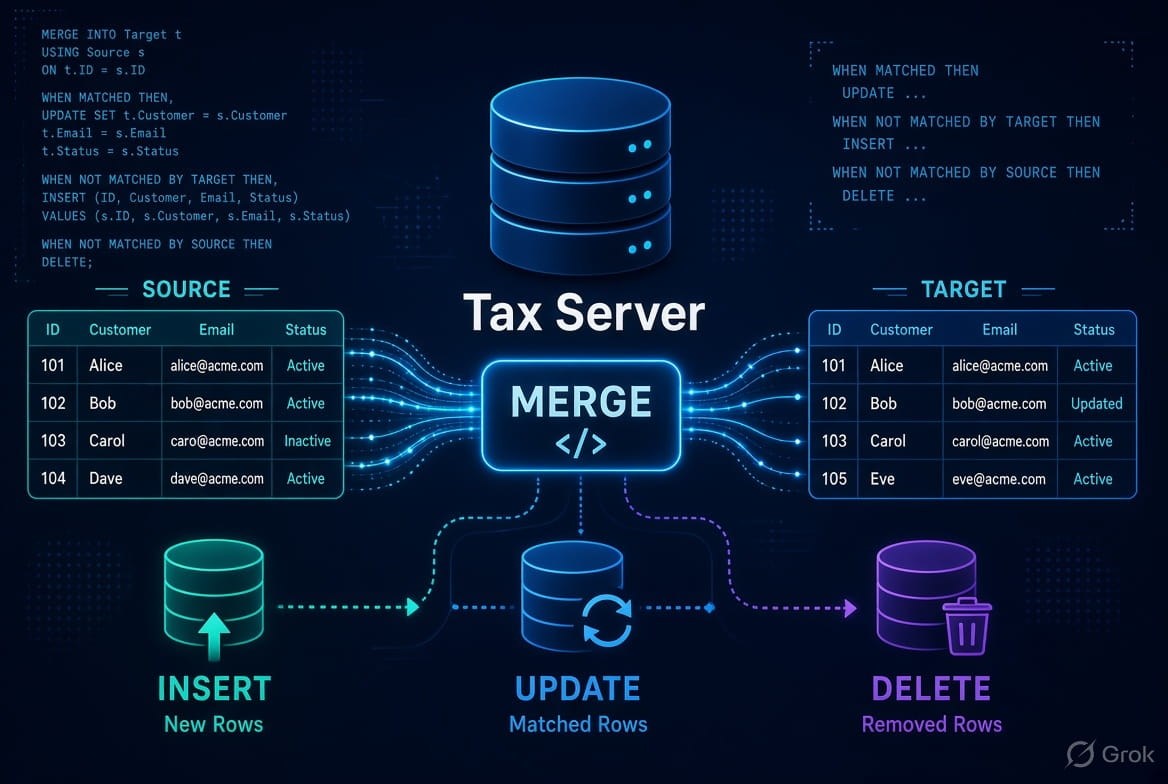
The MERGE statement in SQL Server is used to synchronize data between a
source table and a target table. It allows you to perform
INSERT, UPDATE, and
DELETE operations in a single statement based on whether rows in the source match rows in the target.
It is particularly useful for data synchronization, ETL processes, data warehousing, and upsert operations.
1. What is the MERGE Statement?
The MERGE statement compares records from a source table with records in a target table using a specified matching condition.
Based on the result of that comparison, SQL Server can:
- Update an existing target row when a match is found.
- Insert a new row when no matching target row exists.
- Delete a target row when it exists but does not have a corresponding source row.
Basic syntax
MERGE INTO TargetTable AS T
USING SourceTable AS S
ON T.Id = S.Id

WHEN MATCHED THEN
    UPDATE SET
        T.Name = S.Name,
        T.Email = S.Email

WHEN NOT MATCHED BY TARGET THEN
    INSERT (Id, Name, Email)
    VALUES (S.Id, S.Name, S.Email)

WHEN NOT MATCHED BY SOURCE THEN
    DELETE;
2. Important Parts of MERGE
A MERGE statement consists of several important clauses.
The general structure is:
MERGE [INTO] TargetTable AS T
USING SourceTable AS S
ON <matching_condition>

WHEN MATCHED THEN
    <UPDATE or DELETE>

WHEN NOT MATCHED BY TARGET THEN
    <INSERT>

WHEN NOT MATCHED BY SOURCE THEN
    <UPDATE or DELETE>;
Let's understand each part.
3. Target Table
The target table is the table that will be modified.
MERGE INTO Employee AS THere:
Employeeis the target table.
The target table can receive:
- Updates
- Inserts
- Deletes
The alias T is used to make the statement easier to read.
MERGE INTO Employee AS TFor example:
T.EmployeeId
T.EmployeeName
T.Salary
4. Source Table
The source contains the data that will be compared with the target.
USING EmployeeSource AS SHere, EmployeeSource is the source table.
The source can be:
- A table
- A view
- A query
- A derived table
- A table-valued expression
For example:
USING
(
    SELECT EmployeeId, EmployeeName, Salary
    FROM EmployeeStaging
) AS S
This is useful when the source data needs to be filtered or transformed before the merge.
5. ON Clause
The ON clause defines how SQL Server determines whether a source row matches a target row.
Example:
ON T.EmployeeId = S.EmployeeIdThis means:
If the
EmployeeIdin the source is equal to theEmployeeIdin the target, the rows are considered matched.
For example:
Target
| EmployeeId | Name | Salary |
|---|---|---|
| 1 | Amit | 30000 |
| 2 | Rahul | 40000 |
| 3 | Priya | 50000 |
Source
| EmployeeId | Name | Salary |
|---|---|---|
| 2 | Rahul | 45000 |
| 3 | Priya | 55000 |
| 4 | Neha | 35000 |
Using:
ON T.EmployeeId = S.EmployeeIdSQL Server identifies:
- Employee 2 → matched
- Employee 3 → matched
- Employee 4 → not matched in target
6. WHEN MATCHED
WHEN MATCHED is executed when a source row matches a target row according to the
ON condition.
The most common operation is UPDATE.
WHEN MATCHED THEN
    UPDATE SET
        T.Name = S.Name,
        T.Salary = S.Salary
For example, if the target contains:
EmployeeId = 2
Salary = 40000
and the source contains:
EmployeeId = 2
Salary = 45000
the target salary will be updated to:
450007. WHEN MATCHED with a Condition
You can add an additional condition.
WHEN MATCHED AND T.Salary <> S.Salary THEN
    UPDATE SET
        T.Salary = S.Salary;
This means the update happens only when the salaries are different.
Another example:
WHEN MATCHED AND S.IsActive = 1 THEN
    UPDATE SET
        T.Name = S.Name;
This allows you to control exactly which matched rows should be updated.
8. WHEN MATCHED THEN DELETE
A matched row can also be deleted.
WHEN MATCHED AND S.IsDeleted = 1 THEN
    DELETE;
For example, suppose the source contains:
| Id | Name | IsDeleted |
|---|---|---|
| 1 | Amit | 0 |
| 2 | Rahul | 1 |
The row for Rahul can be deleted from the target.
9. WHEN NOT MATCHED BY TARGET
This condition is used when a source row does not have a corresponding row in the target.
It is commonly used for INSERT.
WHEN NOT MATCHED BY TARGET THEN
    INSERT (EmployeeId, Name, Salary)
    VALUES (S.EmployeeId, S.Name, S.Salary);
For example:
Target
| Id | Name |
|---|---|
| 1 | Amit |
| 2 | Rahul |
Source
| Id | Name |
|---|---|
| 2 | Rahul |
| 3 | Priya |
Employee 3 does not exist in the target, so SQL Server inserts it.
After the merge:
| Id | Name |
|---|---|
| 1 | Amit |
| 2 | Rahul |
| 3 | Priya |
10. WHEN NOT MATCHED BY SOURCE
This condition identifies target rows that do not have a corresponding row in the source.
For example:
WHEN NOT MATCHED BY SOURCE THEN
    DELETE;
Suppose the target contains:
| Id | Name |
|---|---|
| 1 | Amit |
| 2 | Rahul |
| 3 | Priya |
and the source contains:
| Id | Name |
|---|---|
| 1 | Amit |
| 2 | Rahul |
Employee 3 exists in the target but not in the source.
Therefore:
WHEN NOT MATCHED BY SOURCE THEN
    DELETE;
will remove Employee 3 from the target.
Important
Be careful with this clause. If the source contains only a subset of the data, deleting every target row that isn't in the source may unintentionally remove valid records.
11. Complete MERGE Example
Let's create two tables.
Target table
CREATE TABLE Employee
(
    EmployeeId INT PRIMARY KEY,
    EmployeeName VARCHAR(100),
    Salary DECIMAL(10,2)
);
Insert some data:
INSERT INTO Employee
VALUES
(1, 'Amit', 30000),
(2, 'Rahul', 40000),
(3, 'Priya', 50000);
Source table
CREATE TABLE EmployeeSource
(
    EmployeeId INT,
    EmployeeName VARCHAR(100),
    Salary DECIMAL(10,2)
);
Insert source data:
INSERT INTO EmployeeSource
VALUES
(2, 'Rahul', 45000),
(3, 'Priya', 55000),
(4, 'Neha', 35000);
Now perform the merge:
MERGE INTO Employee AS T
USING EmployeeSource AS S
ON T.EmployeeId = S.EmployeeId

WHEN MATCHED THEN
    UPDATE SET
        T.EmployeeName = S.EmployeeName,
        T.Salary = S.Salary

WHEN NOT MATCHED BY TARGET THEN
    INSERT (EmployeeId, EmployeeName, Salary)
    VALUES (S.EmployeeId, S.EmployeeName, S.Salary);
What happens?
| EmployeeId | Target Action |
|---|---|
| 1 | No action |
| 2 | UPDATE |
| 3 | UPDATE |
| 4 | INSERT |
The final target table becomes:
| EmployeeId | EmployeeName | Salary |
|---|---|---|
| 1 | Amit | 30000 |
| 2 | Rahul | 45000 |
| 3 | Priya | 55000 |
| 4 | Neha | 35000 |
12. MERGE with INSERT, UPDATE, and DELETE
A single MERGE can contain different actions.
MERGE INTO Employee AS T
USING EmployeeSource AS S
ON T.EmployeeId = S.EmployeeId

WHEN MATCHED AND S.IsDeleted = 1 THEN
    DELETE

WHEN MATCHED THEN
    UPDATE SET
        T.EmployeeName = S.EmployeeName,
        T.Salary = S.Salary

WHEN NOT MATCHED BY TARGET THEN
    INSERT
    (
        EmployeeId,
        EmployeeName,
        Salary
    )
    VALUES
    (
        S.EmployeeId,
        S.EmployeeName,
        S.Salary
    );
Conceptually:
                Source
                   |
                   v
          Compare using ON
                   |
        +----------+----------+
        |                     |
      MATCH                NO MATCH
        |                     |
        v                     v
     UPDATE                 INSERT
      or
     DELETE
13. MERGE with USING a Query
The source doesn't have to be a physical table.
You can use a query:
MERGE INTO Employee AS T
USING
(
    SELECT EmployeeId, EmployeeName, Salary
    FROM EmployeeStaging
    WHERE IsValid = 1
) AS S
ON T.EmployeeId = S.EmployeeId

WHEN MATCHED THEN
    UPDATE SET
        T.EmployeeName = S.EmployeeName,
        T.Salary = S.Salary

WHEN NOT MATCHED BY TARGET THEN
    INSERT (EmployeeId, EmployeeName, Salary)
    VALUES (S.EmployeeId, S.EmployeeName, S.Salary);
This is useful in ETL applications where staging data needs to be filtered before synchronization.
14. MERGE with Multiple Conditions
You can use conditions with the different WHEN clauses.
Example:
MERGE INTO Employee AS T
USING EmployeeSource AS S
ON T.EmployeeId = S.EmployeeId

WHEN MATCHED AND S.IsActive = 1 THEN
    UPDATE SET
        T.EmployeeName = S.EmployeeName,
        T.Salary = S.Salary

WHEN MATCHED AND S.IsActive = 0 THEN
    DELETE

WHEN NOT MATCHED BY TARGET AND S.IsActive = 1 THEN
    INSERT (EmployeeId, EmployeeName, Salary)
    VALUES (S.EmployeeId, S.EmployeeName, S.Salary);
This allows different actions depending on the source data.
15. MERGE and UPSERT
A common use of MERGE is implementing an upsert.
Upsert = UPDATE + INSERT
The logic is:
If record exists
       ↓
    UPDATE

If record doesn't exist
       ↓
    INSERT
Example:
MERGE INTO Employee AS T
USING EmployeeSource AS S
ON T.EmployeeId = S.EmployeeId

WHEN MATCHED THEN
    UPDATE SET
        T.EmployeeName = S.EmployeeName,
        T.Salary = S.Salary

WHEN NOT MATCHED BY TARGET THEN
    INSERT (EmployeeId, EmployeeName, Salary)
    VALUES (S.EmployeeId, S.EmployeeName, S.Salary);
This is one of the most common patterns for MERGE.
16. MERGE with OUTPUT
The OUTPUT clause can be used to determine what happened to the rows.
For example:
MERGE INTO Employee AS T
USING EmployeeSource AS S
ON T.EmployeeId = S.EmployeeId

WHEN MATCHED THEN
    UPDATE SET
        T.Salary = S.Salary

WHEN NOT MATCHED BY TARGET THEN
    INSERT (EmployeeId, EmployeeName, Salary)
    VALUES (S.EmployeeId, S.EmployeeName, S.Salary)

OUTPUT
    $action,
    inserted.EmployeeId,
    inserted.EmployeeName,
    inserted.Salary;
$action tells you which operation occurred.
Possible values include:
INSERT
UPDATE
DELETE
This can be useful for auditing and logging.
17. MERGE with a Transaction
For important data synchronization operations, you may want explicit transaction handling.
BEGIN TRANSACTION;

BEGIN TRY

    MERGE INTO Employee AS T
    USING EmployeeSource AS S
    ON T.EmployeeId = S.EmployeeId

    WHEN MATCHED THEN
        UPDATE SET
            T.EmployeeName = S.EmployeeName,
            T.Salary = S.Salary

    WHEN NOT MATCHED BY TARGET THEN
        INSERT (EmployeeId, EmployeeName, Salary)
        VALUES (S.EmployeeId, S.EmployeeName, S.Salary);

    COMMIT TRANSACTION;

END TRY
BEGIN CATCH

    IF @@TRANCOUNT > 0
        ROLLBACK TRANSACTION;

    THROW;

END CATCH;
The transaction ensures that the operation can be rolled back if an error occurs.
18. MERGE Restrictions
There are several important restrictions and considerations.
18.1 Multiple source rows must not match the same target row
Suppose the target has:
EmployeeId = 1but the source contains:
EmployeeId = 1
EmployeeId = 1
Both source rows match the same target row.
If the MERGE tries to update that target row, SQL Server can raise an error because one target row cannot be updated multiple times by the same
MERGE.
Therefore, the source should generally contain a unique row for each matching key.
19. Avoid Duplicate Source Records
Before using MERGE, make sure the source data is appropriately deduplicated.
For example:
USING
(
    SELECT
        EmployeeId,
        MAX(EmployeeName) AS EmployeeName,
        MAX(Salary) AS Salary
    FROM EmployeeSource
    GROUP BY EmployeeId
) AS S
This can help ensure that each EmployeeId appears only once in the source.
However, the correct deduplication logic depends on the business requirements. Simply using
MAX() isn't necessarily appropriate for every column.
20. MERGE and NULL Values
Special care is needed when the matching columns can contain NULL.
For example:
ON T.Email = S.EmailIf both emails are NULL, the expression does not evaluate to
TRUE because SQL uses three-valued logic.
If your business rules consider two NULL values equivalent, you need an appropriate explicit condition.
For example:
ON
    T.Email = S.Email
    OR (T.Email IS NULL AND S.Email IS NULL)
Whether this is appropriate depends on the data model.
21. MERGE Performance
Performance depends on several factors:
- Size of source data
- Size of target data
- Indexes
- Matching condition
- Number of rows affected
- Query plan
- Data distribution
- Concurrent transactions
The columns used in the ON condition should generally be indexed appropriately when dealing with large datasets.
For example:
CREATE INDEX IX_Employee_EmployeeId
ON Employee(EmployeeId);
If EmployeeId is already the primary key, an additional index on that exact column may not be necessary.
22. MERGE and Concurrency
Concurrency is an important consideration when using MERGE.
Two sessions can potentially operate on the same data concurrently, so the behavior should be tested under the transaction isolation and locking requirements of your application.
For synchronization processes with strict concurrency requirements, SQL Server locking hints or explicit transaction strategies may be considered, but they should be chosen based on the specific workload rather than copied blindly.
23. Is MERGE Always the Best Choice?
Not necessarily.
Although MERGE provides a convenient way to express synchronization logic, SQL Server
MERGE has a long history of documented edge cases, bugs, and concurrency-related considerations.
For simple upsert logic, separate statements such as:
UPDATE ...followed by:
INSERT ...can sometimes be easier to reason about and maintain.
For example:
BEGIN TRANSACTION;

UPDATE T
SET
    T.Name = S.Name,
    T.Salary = S.Salary
FROM Employee AS T
INNER JOIN EmployeeSource AS S
    ON T.EmployeeId = S.EmployeeId;

INSERT INTO Employee
(
    EmployeeId,
    Name,
    Salary
)
SELECT
    S.EmployeeId,
    S.Name,
    S.Salary
FROM EmployeeSource AS S
WHERE NOT EXISTS
(
    SELECT 1
    FROM Employee AS T
    WHERE T.EmployeeId = S.EmployeeId
);

COMMIT TRANSACTION;
This approach has more code but can make the individual operations easier to understand and troubleshoot.
24. Common Mistakes with MERGE
Mistake 1: Incorrect ON condition
Bad matching conditions can cause unexpected updates or inserts.
ON T.Name = S.NameUsing a non-unique column such as Name may produce incorrect matches.
A stable business key or primary key is generally preferable.
Mistake 2: Duplicate source rows
Duplicate source keys can cause errors or unexpected behavior.
Always understand the uniqueness of your source data.
Mistake 3: Unconditional DELETE
This can be dangerous:
WHEN NOT MATCHED BY SOURCE THEN
    DELETE;
If the source represents only a subset of the target data, valid target rows could be deleted.
Mistake 4: Using MERGE without testing concurrency
A query that works correctly in a single-user test may behave differently when multiple sessions modify the same data.
Mistake 5: Ignoring indexes
Large source and target tables can result in poor performance if the matching operation isn't supported by appropriate indexing.
25. MERGE vs Separate INSERT/UPDATE/DELETE
| Feature | MERGE | Separate Statements |
|---|---|---|
| Insert | Yes | Yes |
| Update | Yes | Yes |
| Delete | Yes | Yes |
| Single statement | Yes | No |
| Syntax | More complex | Usually simpler |
| Synchronization | Convenient | Requires multiple statements |
| Debugging | Can be harder | Often easier |
| Concurrency considerations | Important | Important |
| Fine-grained control | Yes | Yes |
The choice depends on the workload, SQL Server version, concurrency requirements, and maintainability needs.
26. Real-World Example
Imagine an organization receives daily employee data from an external HR system.
The external system provides:
EmployeeId
EmployeeName
Department
Salary
The organization stores this data in:
Employeeand receives new data in:
EmployeeStaging
The synchronization requirement is:
- If the employee already exists → update the employee.
- If the employee doesn't exist → insert the employee.
- Optionally, if the source is authoritative and an employee is missing from the source → deactivate or delete the employee.
A MERGE can express the first two requirements:
MERGE INTO Employee AS T
USING EmployeeStaging AS S
ON T.EmployeeId = S.EmployeeId

WHEN MATCHED THEN
    UPDATE SET
        T.EmployeeName = S.EmployeeName,
        T.Department = S.Department,
        T.Salary = S.Salary

WHEN NOT MATCHED BY TARGET THEN
    INSERT
    (
        EmployeeId,
        EmployeeName,
        Department,
        Salary
    )
    VALUES
    (
        S.EmployeeId,
        S.EmployeeName,
        S.Department,
        S.Salary
    );
This pattern is commonly associated with ETL and data synchronization workloads.
27. Key Points to Remember
The most important concepts are:
MERGEsynchronizes a source with a target.- The target is the table being modified.
- The source provides the data used for comparison.
- The
ONclause defines how source and target rows are matched. WHEN MATCHEDhandles rows that match.WHEN NOT MATCHED BY TARGETcommonly handles inserts.WHEN NOT MATCHED BY SOURCEhandles target rows missing from the source.MERGEcan perform INSERT, UPDATE, and DELETE operations.- Source keys should be appropriately unique to avoid multiple source rows matching one target row.
- Indexes can be important for performance.
- Concurrency and transaction behavior should be tested for production workloads.
MERGEis not automatically the best solution for every upsert or synchronization problem; separateINSERT/UPDATE/DELETEstatements can sometimes be clearer and safer to maintain.
Conclusion
The SQL Server MERGE statement provides a compact way to synchronize two data sets. Its ability to handle
matched and unmatched records makes it useful for upsert and ETL scenarios.
The basic mental model is:
                 SOURCE
                    |
                    v
              Match using ON
                    |
          +---------+---------+
          |                   |
       MATCHED            NOT MATCHED
          |                   |
       UPDATE              INSERT
       or DELETE
However, MERGE should be used carefully, particularly when the source can contain duplicate keys or when multiple sessions may modify the same data concurrently. For many production systems, comparing
MERGE with explicit UPDATE + INSERT logic is worthwhile before choosing the implementation.


Leave a Comment