PostBack in ASP.Net
PostBack is an event that is triggered when an action is performed by an ASP.Net Control.
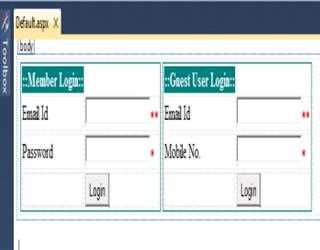
Validation Group Property in Asp.Net
ASP.Net 2.0 supports validation groups, which is a new feature that is included in this version. The validation groups help you to group the controls in a single page and you can have separate submit buttons for each group,
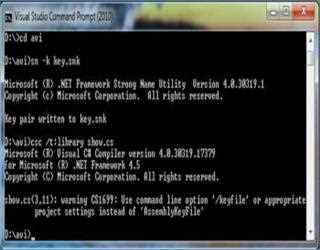
Strong name and gacutil command in .Net
Strong Name is similar to GUID (It is supposed to be unique in space and time). In COM components, Strong name is only needed when we need to deploy assembly in GAC. Strong names help GAC to differentiate between two versions.
Introduction to Open New Browser Window using C#.Net
If you want to open new browser window then you can use this code.
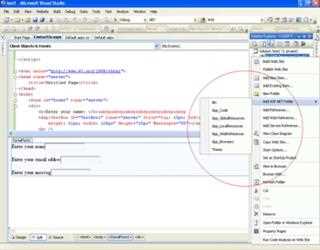
Default Folders Available inside the ASP.NET Application Folder
With the release of ASP.NET 2.0, Microsoft has greatly increased the power of ASP.NET by introducing a suite of new features and functionalities.
How do you hide a column for a DataBound GridView
The way to hide a column in a DataBound GridView is to trap the RowCreated Event and set a Cell inside the column of the row to Visible = false. Nice!
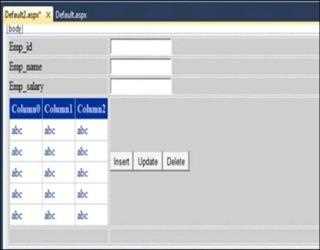
Insert, Update and Delete data in GridView using the SQL Database
This article helps you to insert the data in gridview, which performs several operations like, inserting, updating and deleting records from DB.
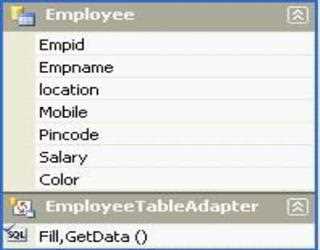
Introduction to Dataset XSD file
In this article, I am going to discuss how a Dataset XSD file can be used to bind a GridControl. XSD file can be created by Add New Item-> Dataset file and give a suitable name and put it under App_Code folder.
Expandable TreeView Node in C#
In this article I’m going to explain how to make expandable treeview node in C# when others node is closed. Here I’m just creating a method to perform this task with name TreeView1_TreeNodeExpanded. Let’s take a look of this method code:
Data Bound with Grid View in C#.Net
Data access is a core of most applications and an ability to efficiently access and modify a database is required for developers on a regular basis. In this article, you will look at accessing SQL-based data utilizing C# and ADO.NET
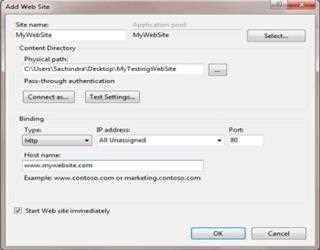
Host Asp.Net Application on IIS Web Server
In this Article I’m going to explain how to host Asp Dot Net application on IIS web server. Here I’ve shown this example on Windows 7 operating system. To host asp.net application on IIS (Internet Information Services), you’ve to follow some follow
How to use confirmation box using JavaScript
This is the simple demonstration in JavaScript how to use confirmation box. Confirmation box are used for check the user confirmation for example you want to delete this item, you want to continue this page etc.