Most developers don't learn about proxies on purpose. You learn about them when an app that works fine on your laptop starts timing out on a client's network. Or when a third-party API answers differently from your staging server than it does from your desk.
The usual explanation is one line: a proxy sits between you and the website. That's true, but it doesn't help much when you're staring at a 407 in your logs at six in the evening.
So instead of another definition, let's follow one request from the moment your code sends it until the response lands. Once you've seen each hop, most proxy problems stop looking mysterious.
The cast: one request, three parties
Without a proxy, a request has two parties. Your client opens a connection to the website's server, sends its request and reads the answer.
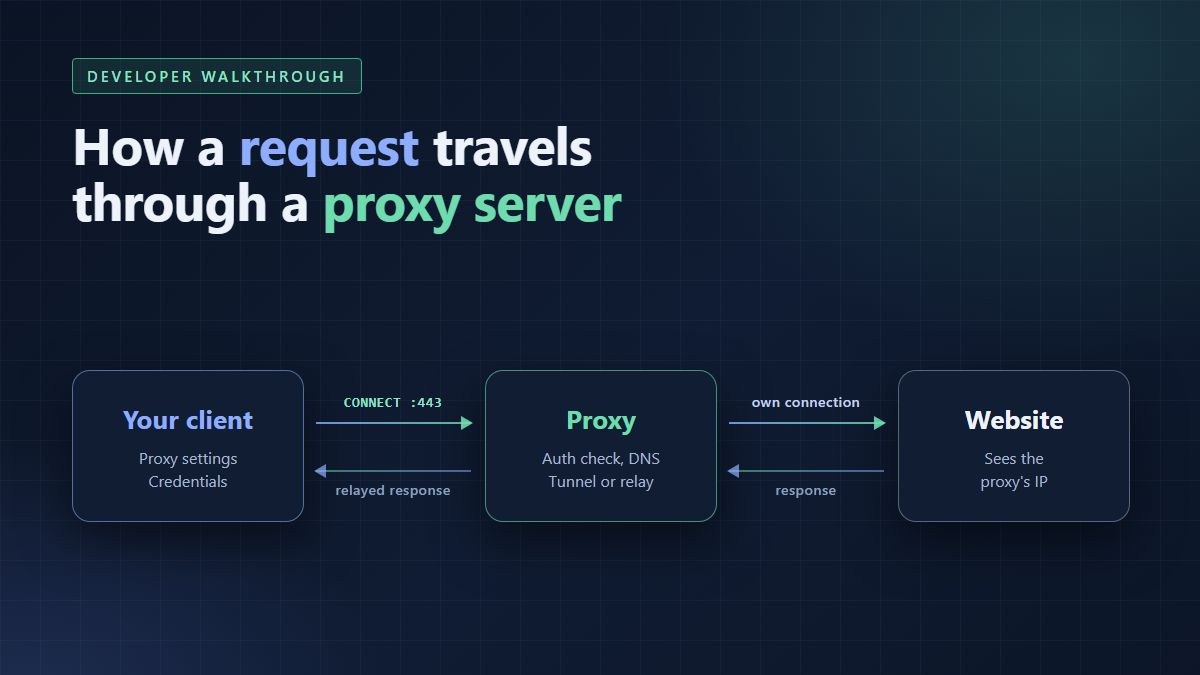
With a forward proxy, there are three. Your client talks only to the proxy. The proxy talks to the website. The website talks only to the proxy, and usually has no direct view of your machine at all.
That middle position is the whole point. Because the proxy makes the outgoing connection, the website sees the proxy's IP address, not yours. Everything else in this walkthrough is detail about how that handoff happens.
One quick note on terms. This article is about forward proxies, the kind a client chooses to use. Reverse proxies sit in front of servers instead, handling jobs like load balancing and TLS. They follow different rules.
Hop 1: your client decides to use the proxy
Before any packet leaves your machine, the HTTP client has to know a proxy exists. This sounds obvious, but it's where a surprising number of bugs start.
There are three common ways a client finds out. You can set the proxy explicitly in your code or in the library's configuration. Many tools also read environment variables such as HTTP_PROXY, HTTPS_PROXY and NO_PROXY. Some runtimes pick up the operating system's proxy settings without being asked.
That last one catches people out. On Windows, for example, .NET's HttpClient follows the system proxy settings by default. So a service can behave one way on a developer's machine and another way on a locked-down corporate server, with identical code.
NO_PROXY deserves its own mention. It lists hosts that should skip the proxy, such as localhost or internal services. Forget it, and calls to your own internal API may wander out through an external proxy and fail in confusing ways.
Different tools also read these variables a little differently, including upper and lower case names. When a request behaves strangely, the first question is always simple: is this client actually using the proxy I think it is?
Hop 2: connecting to the proxy and proving who you are
Once the client knows about the proxy, it opens a TCP connection to the proxy's host and port. Note what it doesn't do: it doesn't connect to the website at all. From the client's side, the proxy is the only server in the conversation.
Private proxies need to know who's calling. With HTTP proxies, the classic flow goes like this. The client sends its request without credentials, and the proxy replies with status 407 Proxy Authentication Required. The client then repeats the request with a Proxy-Authorization header carrying a username and password.
Many clients skip the first round trip and send credentials straight away. Either way, the important detail is that Basic authentication is just base64 encoding. It isn't encryption, so the credentials are readable on the hop between you and the proxy unless that hop is encrypted too.
The other common approach is an IP allow list. The proxy accepts any connection from approved addresses and asks for nothing else. It's convenient on a fixed server. It gets awkward when your code runs on laptops, CI runners or serverless functions with changing addresses.
If you see a 407 in your logs, the request never reached the website. The proxy stopped it at the door. That single fact saves a lot of debugging time.
Hop 3a: a plain HTTP request
For an unencrypted http:// address, the client sends the proxy a normal HTTP request with one twist. Instead of just the path, it sends the full URL, including the scheme and host name. The HTTP specification calls this the absolute form.
That full URL is how the proxy knows where to go. A direct request only needs the path, because the connection already points at the right server. A proxy connection points at the proxy, so the destination has to travel inside the request itself.
Because everything is in plain text, the proxy can read the whole request. It can filter it, log it, change headers, serve a cached copy or refuse it outright. Office web filters and caching proxies have worked this way for decades.
The proxy also cleans up some headers on the way through. Headers meant only for one hop, such as Proxy-Authorization, are normally consumed by the proxy and not passed to the website. Some proxies add headers of their own, such as Via or X-Forwarded-For, which can reveal that a proxy was involved.
Hop 3b: an HTTPS request and the CONNECT tunnel
Almost everything you call today uses HTTPS, and here the proxy plays a very different role. The client can't send its real request in the open, because that would defeat the encryption.
So it asks the proxy for a tunnel instead. It sends a CONNECT request naming only the host and port, say example.com on port 443. The proxy opens a TCP connection to that address and replies with a 200 status if it succeeds.
From that point on, the proxy stops acting like an HTTP server. It just copies bytes in both directions. Your client runs the TLS handshake directly with the website, through the tunnel, and the encryption runs end to end.
This is the part many developers get wrong in their mental model. During an HTTPS session, a typical proxy sees the host name, the port, the timing and the amount of data. It doesn't see the paths, the headers, the cookies or the response bodies.
There's one well-known exception, called TLS inspection. Some corporate networks decrypt HTTPS at the proxy and re-encrypt it on the way out. That only works because the company installs its own root certificate on every managed device. Unmanaged clients on those networks throw certificate errors instead.
Hop 4: the proxy talks to the website
Now the proxy does the work you'd normally do yourself. It looks up the website's address in DNS, opens its own connection and sends the request, or carries the tunnel.
Two consequences follow, and both matter for how your app behaves. First, the DNS lookup usually happens on the proxy's side, so the answer depends on the proxy's network, not yours. Second, the website sees the proxy's outgoing IP address as the visitor.
That outgoing IP decides a lot. Many sites use it to estimate location, choose a language, pick a currency or decide which content to show. That's why the same request can return different pages depending on where the proxy's exit point sits.
The kind of IP matters too. Data center addresses, home broadband addresses and mobile carrier addresses are often treated differently by the sites receiving them. For a wider look at what a proxy server does, ProxyEmpire's guide covers the main proxy types and where each one fits.
A SOCKS5 proxy follows the same broad pattern with less HTTP logic. It relays raw connections for any protocol, after a short handshake. Depending on the client's settings, the host name is resolved either locally or by the proxy. Check which one you get if DNS privacy matters to you.
Hop 5: the response comes back
The website answers the proxy, and the proxy relays that answer to your client. For plain HTTP, the proxy may store a copy if caching is enabled. For HTTPS, it simply passes the encrypted bytes back through the tunnel.
Here's the useful habit for debugging: learn to tell the proxy's errors apart from the website's. They arrive through the same connection, so they're easy to confuse.
- 407 Proxy Authentication Required. The proxy rejected your credentials, or none were sent. The website never saw the request.
- 502 Bad Gateway. The proxy couldn't get a valid answer from the website. The upstream connection failed, or the response was broken.
- 504 Gateway Timeout. The proxy waited for the website and gave up. Your client might have waited even longer, which is a separate problem.
- 403, 404 or 429 with the site's own error page. The request got through, and these came from the website. The proxy did its job, and the answer is the site's decision.
Response bodies and headers usually give it away. A proxy error tends to be short and generic, while a website error carries the site's own branding, cookies or headers.
Where developers usually get tripped up
Once you know the hops, the common problems map neatly onto them. These are the ones that come up again and again in real projects.
- Stacked timeouts. There's a timeout between your client and the proxy, and another between the proxy and the website. Set your client's limit with both in mind, or you'll get vague failures that look random.
- Connection reuse with rotating IPs. Rotating proxies hand out different exit addresses over time. Inside one HTTPS tunnel, though, every request leaves from the same exit, because the proxy only sees one long connection.
- Sticky sessions that aren't sticky. The opposite problem appears when a multi-step flow needs one consistent IP. If your client opens fresh connections between steps, the exit address may change halfway through.
- Internal calls leaking out. A missing NO_PROXY entry sends calls to internal services through the external proxy. They fail slowly, and the logs often blame the wrong thing.
- Assuming the proxy hides everything. A proxy changes who the site thinks is visiting. It doesn't change what you send once you're there, including cookies, tokens and identifying headers.
- Testing through the wrong path. If your test machine ignores the proxy settings, your tests pass while production fails. Log the exit IP your requests actually use during testing.
A quick way to check the path yourself
You don't need special tools to confirm what's happening. Most HTTP clients have a verbose or debug mode that prints connection details. Turn it on and look for two things: which host and port the client connects to, and whether it sends CONNECT.
Then call a simple service that echoes your visible IP address, once with the proxy and once without. If the two addresses match, your traffic isn't going through the proxy, whatever the config file says.
For location-sensitive work, compare a page or API response from two different exit locations. Differences in language, currency or content tell you the site is reading the proxy's IP the way you expected.
The mental model to keep
Strip away the details and a proxied request is just a relay with clear rules. Your client talks to the proxy. The proxy talks to the website. Each side only sees its own neighbour.
For plain HTTP, the proxy reads the full request and can act on it. For HTTPS, it opens a tunnel and stays out of the conversation. In both cases, the website sees the proxy's address and judges the request by it.
Keep those hops in your head, and proxy issues become ordinary debugging. A 407 is a door problem, a 502 is an upstream problem, and a wrong country is an exit problem. That's a much better place to be than guessing.


Leave a Comment