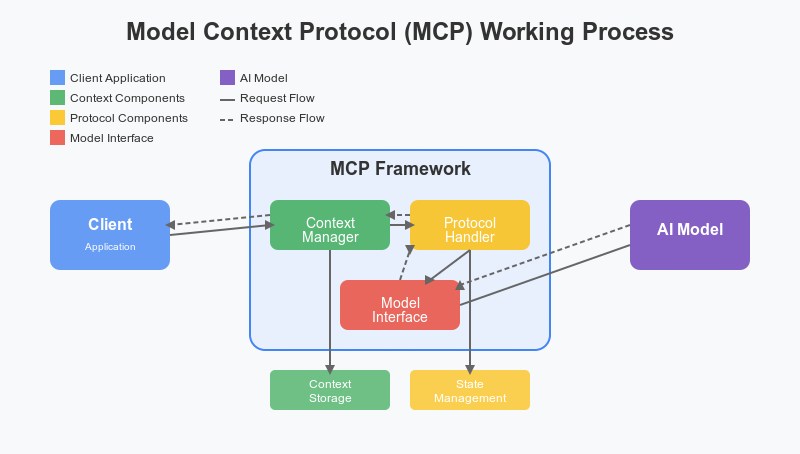
As AI assistants become more capable, one of the biggest challenges is enabling them to interact with external tools, databases, and applications. This is where MCP (Model Context Protocol) comes in.
MCP is an open standard introduced by Anthropic that allows AI assistants like Claude to communicate with external systems through a standardized interface. Instead of creating custom integrations for every application, developers can build an MCP server once and expose its capabilities to AI models that support the protocol.
If you're interested in AI agents and workflow automation, learning how to build your first MCP server is an excellent place to start.
What is an MCP Server?
An MCP server acts as a bridge between Claude and external resources.
It can expose capabilities such as:
- Reading files
- Querying databases
- Accessing APIs
- Searching documentation
- Executing business workflows
- Performing calculations
Think of an MCP server as a collection of tools that Claude can use whenever it needs additional information or actions.
How MCP Works
The communication flow looks like this:
User Request
      ↓
Claude
      ↓
MCP Server
      ↓
External System
      ↓
Response Returned
      ↓
Claude Generates Answer
Instead of relying only on its training data, Claude can retrieve real-time information and perform actions through the MCP server.
Prerequisites
Before building your first MCP server, you should have:
- Basic knowledge of JavaScript or TypeScript
- Node.js installed
- npm package manager
- Claude Desktop installed
- Familiarity with APIs and JSON
Setting Up the Project
Create a new project:
mkdir my-first-mcp-server
cd my-first-mcp-server
npm init -y
Install the required MCP SDK:
npm install @modelcontextprotocol/sdk
You may also install TypeScript if you prefer working with typed code:
npm install typescript ts-node --save-dev
Project Structure
A simple MCP server might look like this:
my-first-mcp-server/
│
├── package.json
├── server.js
└── tools/
Creating Your First Tool
Let's build a simple tool that returns the current time.
server.js
// Import MCP server classes
const { Server } = require("@modelcontextprotocol/sdk/server");

// Create a new MCP server instance
const server = new Server({
  name: "my-first-server",
  version: "1.0.0"
});

// Register a tool
server.tool(
  "current_time",
  "Returns the current date and time",
  async () => {
    return {
      content: [
        {
          type: "text",
          text: new Date().toString()
        }
      ]
    };
  }
);

// Start the server
server.listen();
This server exposes a single tool called current_time that Claude can use whenever a user asks for the current date or time.
Adding a Calculator Tool
You can create more useful tools.
server.tool(
  "multiply",
  "Multiply two numbers",
  async ({ a, b }) => {
    return {
      content: [
        {
          type: "text",
          text: String(a * b)
        }
      ]
    };
  }
);
This allows Claude to perform calculations by calling your custom tool.
Connecting the MCP Server to Claude Desktop
Claude Desktop can be configured to use local MCP servers.
The configuration file typically contains:
{
  "mcpServers": {
    "my-first-server": {
      "command": "node",
      "args": [
        "/path/to/my-first-mcp-server/server.js"
      ]
    }
  }
}
After saving the configuration:
Restart Claude Desktop.
Open a new conversation.
Claude should automatically detect your MCP server and its available tools.
Building an API Integration Tool
MCP servers become truly powerful when connected to external APIs.
Example:
Claude
   ↓
MCP Server
   ↓
Weather API
   ↓
Current Forecast
   ↓
User Response
You can create tools that:
- Retrieve stock prices
- Query databases
- Access internal business systems
- Read documentation
- Connect to project management tools
Creating a File Reader Tool
Example concept:
server.tool(
  "read_file",
  "Read a local text file",
  async ({ path }) => {
    // Read file contents
    // Return text to Claude
  }
);
This allows Claude to analyze documents and answer questions based on file content.
Real-World MCP Server Ideas
Documentation Assistant
Search internal company documentation.
GitHub Assistant
Analyze repositories and generate code summaries.
Customer Support Assistant
Retrieve knowledge-base articles and draft responses.
Database Assistant
Run queries and generate business reports.
Project Management Assistant
Read tasks and generate status updates.
Best Practices for Building MCP Servers
Keep Tools Small and Focused
Each tool should solve a specific problem.
Use Clear Descriptions
Claude relies on descriptions to determine when to use a tool.
Validate Input
Always verify parameters before performing actions.
Implement Proper Error Handling
Return meaningful messages if something goes wrong.
Protect Sensitive Information
Use authentication and access controls when connecting to business systems.
Security Considerations
Since MCP servers may access important systems, consider implementing:
- API authentication
- User permissions
- Rate limiting
- Audit logs
- Restricted file access
Security should be built into your MCP server from the beginning.
Why Learning MCP Matters
MCP is becoming a foundational technology for:
- AI agents
- Workflow automation
- Enterprise AI applications
- Intelligent assistants
- Multi-tool AI systems
As organizations increasingly adopt Agentic AI, developers who understand MCP will be well-positioned to build the next generation of AI-powered applications.
Final Thoughts
Building your first MCP server for Claude is easier than it might seem. With only a few lines of code, you can give Claude access to external tools, APIs, and data sources that dramatically expand its capabilities.
Whether you're building a simple calculator, connecting business systems, or creating advanced AI agents, MCP provides a standardized and scalable way to integrate Claude with the real world.
Learning MCP today is an investment in the future of AI development, where intelligent assistants will increasingly rely on tools and external context to perform meaningful work.


Leave a Comment