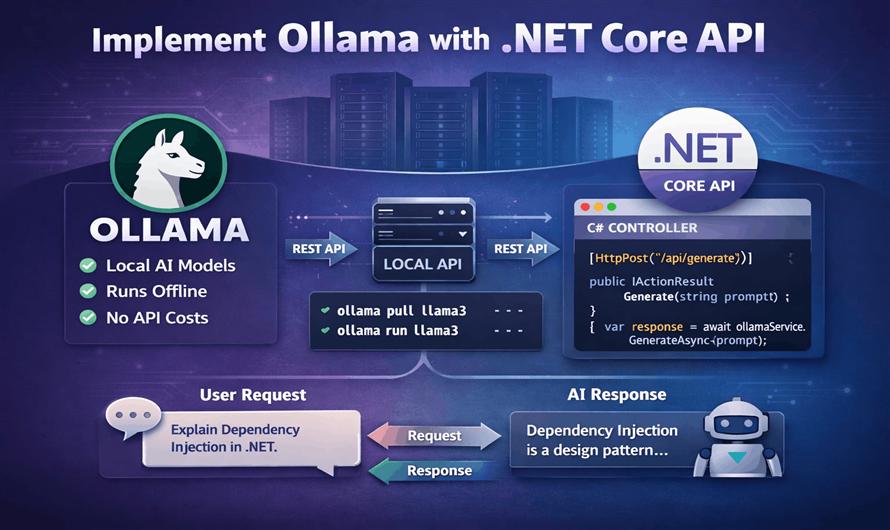
Artificial Intelligence is rapidly becoming a core part of modern web applications. From chatbots and content generation to code assistants and document analysis, developers are integrating Large Language Models (LLMs) into applications faster than ever.
While cloud AI services like OpenAI and Google are popular, many developers now prefer running AI models locally for:
- Better privacy
- Lower API cost
- Offline access
- Faster experimentation
- Full control over models
This is where Ollama becomes extremely useful.
In this article, you will learn how to integrate Ollama with an ASP.NET Core API and build your own AI-powered backend service.
What is Ollama?
Ollama is a lightweight tool that allows you to run Large Language Models locally on your machine.
It supports models like:
- Llama 3
- Mistral
- Gemma
- DeepSeek
- Phi
- CodeLlama
Ollama exposes a local REST API, making it easy to integrate with .NET applications.
Why Use Ollama with .NET?
Benefits of integrating Ollama with ASP.NET Core:
| Feature | Benefit |
|---|---|
| Local AI Processing | No external API dependency |
| Privacy | Data stays on your machine |
| No Token Billing | No per-request charges |
| Easy Integration | REST-based API |
| Fast Development | Works with HttpClient |
| Offline Support | Internet not required |
Prerequisites
Before starting, install:
- .NET 8 SDK
- Ollama
- Visual Studio 2022 / VS Code
Install Ollama
Download Ollama from:
After installation, verify:
ollama --versionPull an AI Model
Example using Llama 3:
ollama pull llama3Run the model:
ollama run llama3Ollama automatically starts a local API server on:
http://localhost:11434Create ASP.NET Core Web API
Create a new project:
dotnet new webapi -n OllamaApiOpen project:
cd OllamaApiCreate Request Models
Create Models/OllamaRequest.cs
namespace OllamaApi.Models
{
    public class OllamaRequest
    {
        public string Model { get; set; }
        public string Prompt { get; set; }
        public bool Stream { get; set; } = false;
    }
}
Create Response Model
Models/OllamaResponse.cs
namespace OllamaApi.Models
{
    public class OllamaResponse
    {
        public string Response { get; set; }
    }
}
Create Ollama Service
Create Services/OllamaService.cs
using System.Text;
using System.Text.Json;
using OllamaApi.Models;

namespace OllamaApi.Services
{
    public class OllamaService
    {
        private readonly HttpClient _httpClient;

        public OllamaService(HttpClient httpClient)
        {
            _httpClient = httpClient;
        }

        public async Task<string> GenerateAsync(string prompt)
        {
            var request = new OllamaRequest
            {
                Model = "llama3",
                Prompt = prompt,
                Stream = false
            };

            var json = JsonSerializer.Serialize(request);

            var content = new StringContent(
                json,
                Encoding.UTF8,
                "application/json");

            var response = await _httpClient.PostAsync(
                "api/generate",
                content);

            response.EnsureSuccessStatusCode();

            var result = await response.Content.ReadAsStringAsync();

            using var document = JsonDocument.Parse(result);

            return document
                .RootElement
                .GetProperty("response")
                .GetString();
        }
    }
}
Register HttpClient
Update Program.cs
using OllamaApi.Services;

var builder = WebApplication.CreateBuilder(args);

builder.Services.AddControllers();

builder.Services.AddHttpClient<OllamaService>(client =>
{
    client.BaseAddress =
        new Uri("http://localhost:11434/");
});

builder.Services.AddEndpointsApiExplorer();
builder.Services.AddSwaggerGen();

var app = builder.Build();

app.UseSwagger();
app.UseSwaggerUI();

app.MapControllers();

app.Run();
Create API Controller
Create Controllers/AiController.cs
using Microsoft.AspNetCore.Mvc;
using OllamaApi.Services;

namespace OllamaApi.Controllers
{
    [ApiController]
    [Route("api/[controller]")]
    public class AiController : ControllerBase
    {
        private readonly OllamaService _ollamaService;

        public AiController(
            OllamaService ollamaService)
        {
            _ollamaService = ollamaService;
        }

        [HttpPost("generate")]
        public async Task<IActionResult> Generate(
            [FromBody] string prompt)
        {
            var result =
                await _ollamaService.GenerateAsync(prompt);

            return Ok(new
            {
                success = true,
                data = result
            });
        }
    }
}
Run the API
Start ASP.NET Core project:
dotnet runSwagger URL:
https://localhost:5001/swaggerTest API Request
Example request:
{
  "prompt": "Explain dependency injection in .NET"
}
Example response:
{
  "success": true,
  "data": "Dependency Injection is a design pattern..."
}
Advanced Features
You can extend the system with:
| Feature | Description |
|---|---|
| Streaming Responses | Real-time token generation |
| Multi-Model Support | Switch models dynamically |
| Chat Memory | Store conversation history |
| Vector Database | Semantic search |
| RAG Pipeline | Retrieval-Augmented Generation |
| AI Agents | Automated workflows |
| Function Calling | Execute server functions |
Using Streaming Responses
Ollama supports token streaming.
Request example:
{
  "model": "llama3",
  "prompt": "Write article about .NET",
  "stream": true
}
Streaming is useful for:
- Chat applications
- Live typing effect
- AI assistants
- Content generation tools
Best Practices
Use Background Services
For heavy AI tasks:
- Queue requests
- Use Hosted Services
- Avoid blocking HTTP requests
Add Timeout Handling
_httpClient.Timeout = TimeSpan.FromMinutes(5);Validate User Prompts
Prevent:
- Prompt injection
- Abuse
- Extremely large requests
Cache Responses
Useful for:
- Repeated prompts
- SEO article generation
- FAQ systems
Real-World Use Cases
| Use Case | Description |
|---|---|
| AI Chatbot | Customer support |
| Auto Blogging | Generate articles |
| Code Assistant | Generate code snippets |
| Q&A Platform | AI answer suggestions |
| Document Summarizer | Summarize PDFs |
| AI Search | Semantic search |
| Email Writer | Generate professional emails |
Ollama vs Cloud AI APIs
| Feature | Ollama | Cloud APIs |
|---|---|---|
| Internet Required | No | Yes |
| Cost | Free | Pay-per-token |
| Privacy | High | Medium |
| Setup Complexity | Medium | Easy |
| Scalability | Local hardware limited | High |
| Offline Usage | Yes | No |
Conclusion
Integrating Ollama with ASP.NET Core is a powerful way to build AI-enabled applications without depending entirely on cloud providers.
With only a few lines of C# code, you can create:
- AI chat systems
- Auto content generators
- AI search engines
- Smart assistants
- Code generation tools
For developers already working in the .NET ecosystem, Ollama provides a simple and cost-effective way to bring local AI capabilities into production-ready applications.


Leave a Comment