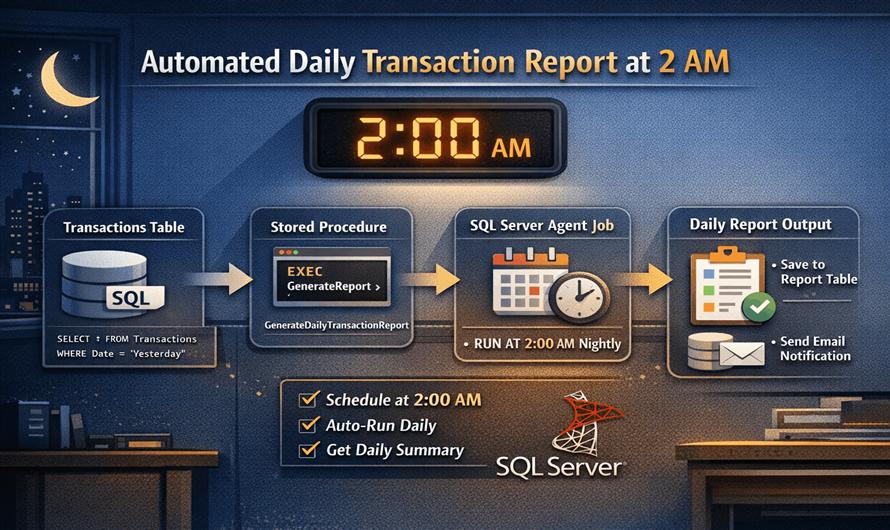
Generating reports manually every day is inefficient. With SQL Server, you can fully automate a daily transaction report to run at a fixed time—like 2 AM—using SQL Server Agent. This approach is reliable, scalable, and production-friendly.
Use Case
You want to:
- Fetch yesterday’s transactions
- Generate a summary/report
- Store or send the report automatically at 2:00 AM daily
Step 1: Create the Report Query
First, write a query to extract daily transaction data.
SELECT
    CAST(TransactionDate AS DATE) AS ReportDate,
    COUNT(*) AS TotalTransactions,
    SUM(Amount) AS TotalAmount
FROM Transactions
WHERE CAST(TransactionDate AS DATE) = CAST(DATEADD(DAY, -1, GETDATE()) AS DATE)
GROUP BY CAST(TransactionDate AS DATE);
This query:
- Filters yesterday’s data
- Calculates total transactions and amount
Step 2: Store Report in a Table (Optional)
You can persist reports for history:
INSERT INTO DailyTransactionReport (ReportDate, TotalTransactions, TotalAmount)
SELECT
    CAST(TransactionDate AS DATE),
    COUNT(*),
    SUM(Amount)
FROM Transactions
WHERE CAST(TransactionDate AS DATE) = CAST(DATEADD(DAY, -1, GETDATE()) AS DATE)
GROUP BY CAST(TransactionDate AS DATE);
Step 3: Create a Stored Procedure
Wrap the logic into a stored procedure for reuse:
CREATE PROCEDURE GenerateDailyTransactionReport
AS
BEGIN
    SET NOCOUNT ON;

    INSERT INTO DailyTransactionReport (ReportDate, TotalTransactions, TotalAmount)
    SELECT
        CAST(TransactionDate AS DATE),
        COUNT(*),
        SUM(Amount)
    FROM Transactions
    WHERE CAST(TransactionDate AS DATE) = CAST(DATEADD(DAY, -1, GETDATE()) AS DATE)
    GROUP BY CAST(TransactionDate AS DATE);
END;
Step 4: Schedule Job Using SQL Server Agent
Now automate it:
- Open SQL Server Management Studio (SSMS)
- Go to SQL Server Agent → Jobs → New Job
- Give job name:
Daily Transaction Report Job
Add Step:
Type: Transact-SQL Script
Command:
EXEC GenerateDailyTransactionReport;Step 5: Set Schedule (2 AM Daily)
- Go to Schedules → New
- Name:
Daily 2AM Schedule - Frequency: Daily
- Time: 02:00:00 AM
Step 6: (Optional) Send Email Notification
You can configure Database Mail and send the report:
EXEC msdb.dbo.sp_send_dbmail
    @profile_name = 'YourMailProfile',
    @recipients = 'admin@company.com',
    @subject = 'Daily Transaction Report',
    @body = 'Please find attached report.',
    @query = 'SELECT * FROM DailyTransactionReport WHERE ReportDate = CAST(GETDATE()-1 AS DATE)';
Best Practices
- Add indexes on
TransactionDatefor performance - Handle time zones (important for global apps)
- Add logging/error handling in the procedure
- Monitor job history in SQL Server Agent
Common Issues
- SQL Server Agent not running → Job won’t execute
- Permission issues → Job fails silently
- Large data → Query may need optimization
Final Thoughts
By combining stored procedures + SQL Server Agent, you can fully automate daily reporting tasks. Scheduling the job at 2 AM ensures minimal load on your system and delivers fresh data every morning without manual effort.


Leave a Comment