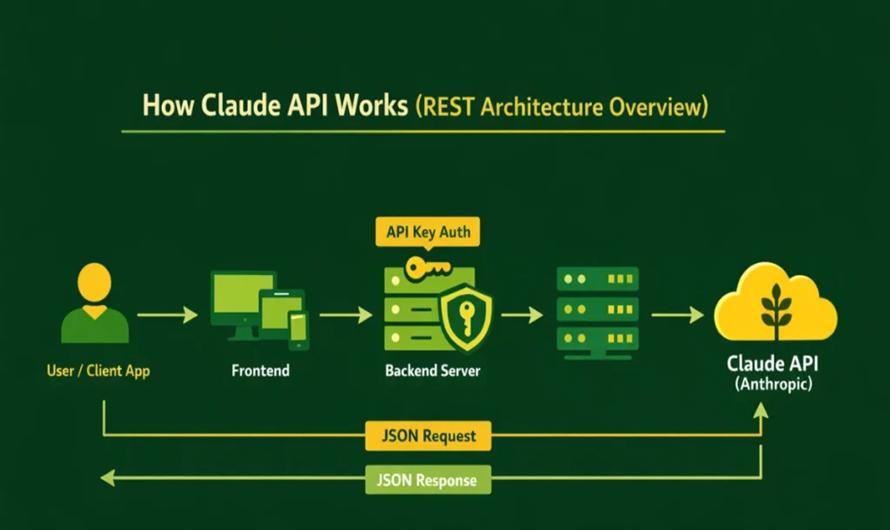
Claude API Integration Example
Using Claude AI API from Anthropic is straightforward because it’s a REST-based API (/v1/messages)
1. Prerequisites
Create account → https://console.anthropic.com
Get API Key
Set environment variable:
export ANTHROPIC_API_KEY=your_api_key_here2. Simple Python Integration (Recommended)
Install SDK:
pip install anthropicExample: Basic Chat Request
from anthropic import Anthropic

client = Anthropic()

response = client.messages.create(
    model="claude-sonnet-4-20250514",
    matokens=500,
    messages=[
        {"role": "user", "content": "Write a blog on SQL Server CTE"}
    ]
)

print(response.content[0].text)
How it works:
model→ which Claude model to usemessages→ conversation formatmatokens→ response length
3. REST API (cURL Example)
curl https://api.anthropic.com/v1/messages \
  -H "Content-Type: application/json" \
  -H "x-api-key: $ANTHROPIC_API_KEY" \
  -H "anthropic-version: 2023-06-01" \
  -d '{
    "model": "claude-sonnet-4-20250514",
    "matokens": 300,
    "messages": [
      {"role": "user", "content": "Explain overfitting in ML"}
    ]
  }'
This hits the main API endpoint used for all requests (Claude)
4. ASP.NET MVC (C# Integration)
Since you’re working with ASP.NET MVC 5, here’s a clean implementation:
C# Service Class
using System;
using System.Net.Http;
using System.Text;
using System.Threading.Tasks;

public class ClaudeService
{
    private readonly string apiKey = "your_api_key_here";
    private readonly string endpoint = "https://api.anthropic.com/v1/messages";

    public async Task<string> GenerateAsync(string prompt)
    {
        using (var client = new HttpClient())
        {
            client.DefaultRequestHeaders.Add("x-api-key", apiKey);
            client.DefaultRequestHeaders.Add("anthropic-version", "2023-06-01");

            var json = @"{
                ""model"": ""claude-sonnet-4-20250514"",
                ""matokens"": 500,
                ""messages"": [
                    { ""role"": ""user"", ""content"": """ + prompt + @""" }
                ]
            }";

            var content = new StringContent(json, Encoding.UTF8, "application/json");
            var response = await client.PostAsync(endpoint, content);
            var result = await response.Content.ReadAsStringAsync();

            return result;
        }
    }
}
Controller Usage
public async Task<ActionResult> GenerateContent()
{
    var service = new ClaudeService();
    var result = await service.GenerateAsync("Write SEO article on AI");

    return Content(result, "application/json");
}
5. Real-World Use Cases (Your Case)
Since you're building auto content + social posting system, you can use Claude API for:
- Blog generation
- SEO content
- Meta tags (OG, title, description)
- Auto summaries
- Social captions
6. Advanced Features
Claude API also supports:
- Streaming responses
- Tool usage (function calling)
- File uploads
- Long context inputs
- All accessible via SDK (Claude)
7. Best Practices
- Use retry logic (API timeouts can happen)
- Cache responses for cost saving
- Use structured prompts for consistency
- Avoid sending unnecessary large data
Final Summary
Claude API = Simple REST + Powerful AI
- Endpoint:
/v1/messages - Input: structured messages
- Output: AI-generated content
- Works with Python, Node, C#, etc.


Leave a Comment