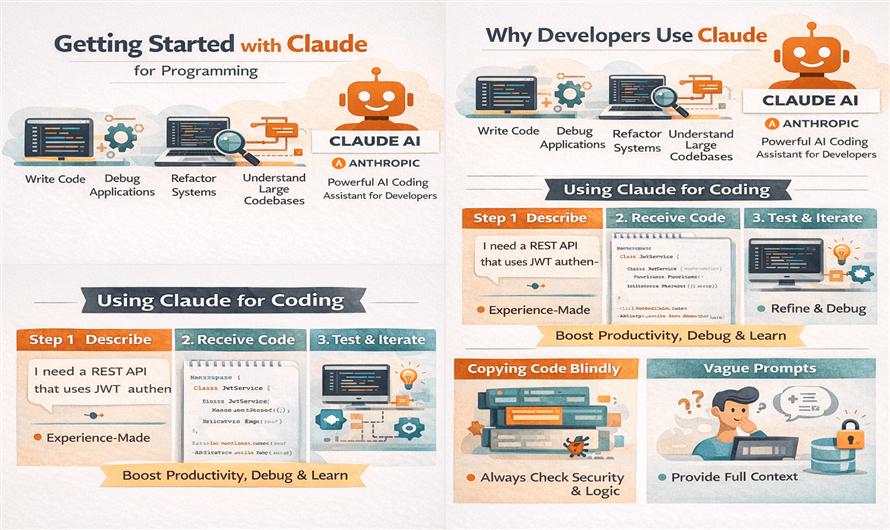
Artificial Intelligence is rapidly changing software development, and one of the most powerful AI coding assistants today is Claude AI by Anthropic.
Developers are increasingly using Claude for:
- Writing code
- Debugging applications
- Refactoring legacy systems
- Understanding large codebases
- Generating documentation
- Learning new technologies
- Automating repetitive tasks
Claude has gained popularity because of its strong reasoning abilities, clean code generation, and impressive long-context understanding.
What Is Claude AI?
Anthropic developed Claude as a family of large language models focused on safety, reasoning, and helpful AI interactions.
Claude can understand natural language prompts and generate:
- Source code
- SQL queries
- API integrations
- Documentation
- Unit tests
- Debugging suggestions
- Architecture explanations
Unlike traditional autocomplete tools, Claude can reason through complex programming problems and analyze large amounts of code in a single conversation.
Learn more from Claude Official Website.
Why Developers Use Claude
Claude has become especially popular among developers because of several key strengths.
1. Large Context Window
Claude can process very large prompts and codebases.
This allows developers to:
- Upload multiple files
- Analyze large projects
- Discuss architecture
- Review long logs
- Debug enterprise applications
This is extremely useful for real-world software engineering.
2. Strong Code Reasoning
Claude performs well when:
- Explaining complex code
- Refactoring legacy systems
- Debugging multi-step problems
- Understanding dependencies
- Reviewing application flow
Many developers use Claude almost like a senior engineering assistant.
3. Clean and Readable Code
Claude often generates:
- Structured code
- Better naming conventions
- Clear explanations
- Maintainable implementations
This helps developers learn while coding.
Setting Up Claude for Programming
Getting started with Claude is simple.
Step 1: Create a Claude Account
Visit:
- Claude AI Platform
- Sign up using your email account.
Step 2: Choose a Claude Model
Claude provides multiple model variants optimized for different tasks.
Common options include:
- Claude Haiku → Fast lightweight tasks
- Claude Sonnet → Balanced coding and reasoning
- Claude Opus → Advanced reasoning and programming
- For most developers, Sonnet is an excellent starting point.
Step 3: Start Writing Prompts
Claude works through prompts.
Instead of writing complicated commands, simply describe your problem naturally.
Example:
Create an ASP.NET MVC 5 login system with Entity Framework and SQL Server.Or:
Debug this LINQ query and explain why it returns duplicate records.The more context you provide, the better Claude performs.
Best Ways to Use Claude for Programming
Code Generation
Claude can generate code for:
- C#
- JavaScript
- Python
- Java
- SQL
- TypeScript
- PHP
- Go
- APIs
- HTML/CSS
Example prompt:
Create a REST API in ASP.NET Core with JWT authentication.Claude will usually provide:
- Models
- Controllers
- Authentication setup
- Middleware
- Database configuration
Debugging Errors
One of Claude’s strongest use cases is debugging.
You can paste:
- Stack traces
- Exception messages
- SQL errors
- Console logs
- Build failures
Example:
Explain this NullReferenceException in my ASP.NET MVC project.Claude often explains:
- Root cause
- Problematic code
- Possible fixes
- Better approaches
Refactoring Legacy Code
Claude performs particularly well with refactoring tasks.
Example:
Refactor this jQuery code into a reusable ES6 class.Or:
Convert this SQL query into LINQ method syntax.This is especially useful for maintaining older enterprise applications.
Learning New Technologies
Claude is also an excellent learning assistant.
You can ask:
- “Explain Dependency Injection in .NET”
- “Teach me Docker step by step”
- “What is CQRS architecture?”
- “How does Redis caching work?”
Claude can explain concepts using examples and real-world scenarios.
Using Claude Effectively
Provide Full Context
Bad prompt:
Fix this code.Better prompt:
This is an ASP.NET MVC 5 application using Entity Framework 6.
The LINQ query returns duplicate records after a left join.
Optimize and fix the issue.
Context dramatically improves results.
Break Large Problems into Steps
Instead of asking for an entire enterprise application at once, break it into:
- Authentication
- Database models
- APIs
- Frontend
- Deployment
This improves accuracy and maintainability.
Ask Claude to Explain Code
Don’t just copy generated code.
Ask:
- Why this approach was used
- Performance implications
- Security concerns
- Alternative implementations
Example:
Explain this middleware step by step.This helps improve programming skills.
Claude for Different Development Areas
Web Development
Claude helps with:
Database Development
Claude can:
- Write SQL queries
- Optimize joins
- Design schemas
- Create stored procedures
- Convert SQL to LINQ
Example:
Optimize this SQL Server query for performance.DevOps and Deployment
Claude also assists with:
- Docker
- Kubernetes
- CI/CD
- GitHub Actions
- Azure
- AWS
- Linux commands
Documentation
Claude can generate:
- API documentation
- README files
- Technical documentation
- Architecture explanations
- Code comments
This saves developers significant time.
Common Mistakes Beginners Make
Blindly Copying Code
Always review AI-generated code carefully.
AI can still:
- Introduce bugs
- Create security issues
- Use outdated libraries
- Hallucinate APIs
Using Vague Prompts
Specific prompts produce better results.
Ignoring Security
Never assume generated code is production-safe.
Always review:
- Authentication
- SQL injection risks
- Input validation
- Authorization
- Encryption
Claude vs Traditional Coding Tools
Traditional coding assistants mainly autocomplete code.
Claude behaves more like:
- A technical mentor
- A debugger
- A reviewer
- A software architect
This changes how developers interact with AI.
Real-World Workflow Example
A developer workflow with Claude might look like this:
Step 1
Describe the feature:
Build a coupon system in ASP.NET MVC.Step 2
Generate database schema.
Step 3
Create APIs and services.
Step 4
Debug issues.
Step 5
Refactor code for scalability.
Step 6
Generate documentation and tests.
Claude can assist throughout the entire lifecycle.
Best Practices for Professional Developers
Use Claude as an Assistant, Not a Replacement
AI improves productivity, but developers still need:
- Problem-solving skills
- Architecture knowledge
- Security understanding
- Debugging ability
Validate Everything
Always:
- Run tests
- Review logic
- Check performance
- Verify dependencies
Combine Claude with IDE Tools
Claude works well alongside:
- VS Code
- GitHub Copilot
- JetBrains IDEs
- Terminal workflows
Many developers combine multiple AI tools together.
The Future of AI Programming Assistants
AI coding assistants are evolving rapidly.
Future improvements may include:
- Autonomous debugging
- Full project generation
- Better architecture reasoning
- Real-time collaboration
- Automated testing
- Intelligent deployment systems
Claude is becoming an important part of this AI-driven development ecosystem.
Conclusion
Claude AI is one of the most powerful AI assistants available for developers today. Its strengths in reasoning, long-context understanding, debugging, and refactoring make it particularly useful for professional software development.
Whether you are:
- Learning programming
- Building web applications
- Refactoring legacy code
- Writing APIs
- Debugging enterprise systems
- Claude can significantly improve productivity and development speed.
However, AI should still be treated as a powerful assistant — not a replacement for engineering knowledge and critical thinking.
Used correctly, Claude can become one of the most valuable tools in a modern developer’s workflow.


Leave a Comment