---
title: "Dropdownlist Using BootStrap in ASP.Net"  
description: "In this blog, I’m explaining how to make dropdownlist using bootstrap in asp.net.Step 1. Create a empty website and add new item then choose web form"  
author: "Anonymous User"  
published: 2014-01-25  
updated: 2014-09-18  
canonical: https://www.mindstick.com/blog/639/dropdownlist-using-bootstrap-in-asp-dot-net  
category: "bootstrap"  
tags: ["bootstrap"]  
reading_time: 2 minutes  

---

# Dropdownlist Using BootStrap in ASP.Net

In this blog, I’m explaining how to make [dropdownlist](https://www.mindstick.com/articles/324837/how-to-bind-dropdownlist-in-mvc-core-from-database-using-entity-framework) using [bootstrap in asp.net](https://www.mindstick.com/forum/33429/editable-list-view-system-using-bootstrap-in-asp-dot-net).

Step 1.

Create a empty [website](https://www.mindstick.com/articles/13110/why-copywriting-is-crucial-for-new-website-build) and add new item then [choose](https://www.mindstick.com/articles/13030/how-to-choose-the-best-online-bitcoin-casino) web form click Add button

Step 2.

##### Open toolbox drag a dropdownlist drop in default.aspx page

##### \

##### Step 3.

```
<script src="JS/jquery.min.js"></script><script src="JS/bootstrap-select.js"></script> <script src="JS/bootstrap.min.js"></script><link href="Bootstrap/bootstrap.css" rel="stylesheet" /><link href="Bootstrap/bootstrap-select.css" rel="stylesheet" /> <link href="Bootstrap/bootstrap.min.css" rel="stylesheet" />
```

Download and add the above three [javascript](https://www.mindstick.com/articles/874/how-to-create-watermark-text-for-textbox-by-using-javascript) file and three .css file into your [projects](https://www.mindstick.com/articles/105927/how-to-excel-at-managing-multiple-projects) because it’s mandatory for using the bootstrap [libraries](https://answers.mindstick.com/qa/49244/which-company-is-ahead-in-classification-of-data-for-libraries-innovations) and methods.

Before using [bootstrap file](https://www.mindstick.com/forum/156874/how-to-create-bootstrap-file-to-design-web-page-in-bootstrap-5) dropdownlist look like this :

\
![Dropdownlist Using BootStrap in ASP.Net](https://www.mindstick.com/blogs/e8f5beb4-e1a6-4601-8cfb-8a2848b35d27/images/ec8835df-4259-4ddd-b1e8-3f448cd7f071.png)

##### Use this method :

```
<script type="text/javascript">    $(document).ready(function () {        $(".selectpicker").selectpicker();    });</script>
```

Code :

```
<asp:DropDownList ID="DropDownList1" CssClass="selectpicker" runat="server">     <asp:ListItem>Allahabad</asp:ListItem>      <asp:ListItem>Kanpur</asp:ListItem>      <asp:ListItem>Rewa</asp:ListItem>      <asp:ListItem>Bhopal</asp:ListItem>      <asp:ListItem>Indore</asp:ListItem>      <asp:ListItem>Jabalpur</asp:ListItem>   </asp:DropDownList>
```

After using bootstrap file and method dropdownlist look like this :

\
![Dropdownlist Using BootStrap in ASP.Net](https://www.mindstick.com/blogs/e8f5beb4-e1a6-4601-8cfb-8a2848b35d27/images/d849f296-b7d7-4f49-9cf3-1cbf4d70c187.png)

1. Dropdownlist with option group like this:

![Dropdownlist Using BootStrap in ASP.Net](https://www.mindstick.com/blogs/e8f5beb4-e1a6-4601-8cfb-8a2848b35d27/images/0e5920a3-a5ae-46e1-8087-5c7bc64a2dba.png)

##### Code :

```
 <select class="selectpicker">    <option>---Select---</option>    <optgroup label="Uttar Pradesh">  <option>Allahabad</option>   <option>Kanpur</option>     <option>Lucknow</option>  </optgroup>    <optgroup label="Madhya Pradesh">       <option>Rewa</option>       <option>Indore</option>  <option>Jabalpur</option>        <option>Bhopal</option>          </optgroup>       <optgroup label="Other">      <option>Delhi</option>        <option>Mumbai</option>      </optgroup>     </select>
```

1. Dropdownlist with multi select :

![Dropdownlist Using BootStrap in ASP.Net](https://www.mindstick.com/blogs/e8f5beb4-e1a6-4601-8cfb-8a2848b35d27/images/eaa9e540-3e3a-4429-ab10-cdda901712d5.png)

##### Code :

```
    <asp:DropDownList ID="DropDownList2" CssClass="selectpicker" runat="server" multiple>           <asp:ListItem>Allahabad</asp:ListItem>           <asp:ListItem>Kanpur</asp:ListItem>           <asp:ListItem>Rewa</asp:ListItem>           <asp:ListItem>Bhopal</asp:ListItem>           <asp:ListItem>Indore</asp:ListItem>           <asp:ListItem>Jabalpur</asp:ListItem>     </asp:DropDownList>
```

1. Dropdownlist with different style like this :

![Dropdownlist Using BootStrap in ASP.Net](https://www.mindstick.com/blogs/e8f5beb4-e1a6-4601-8cfb-8a2848b35d27/images/18d2596d-1945-437c-b0fc-2f27cec2b587.png)

##### Code :

##### 1. data-style="btn-primary"

##### 2. data-style="btn-info"

##### 3. data-style="btn-success"

##### 4. data-style="btn-warning"

##### 5. data-style="btn-danger"

##### 6. data-style="btn-inverse"

```
<asp:DropDownList ID="DropDownList3" CssClass="selectpicker" data-style="btn-primary" runat="server">         <asp:ListItem>Allahabad</asp:ListItem>         <asp:ListItem>Kanpur</asp:ListItem>         <asp:ListItem>Rewa</asp:ListItem>         <asp:ListItem>Bhopal</asp:ListItem>         <asp:ListItem>Indore</asp:ListItem>         <asp:ListItem>Jabalpur</asp:ListItem></asp:DropDownList>
```

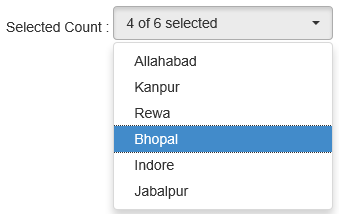
1. DropDownlist : To Show number of selected items from total number of items

![Dropdownlist Using BootStrap in ASP.Net](https://www.mindstick.com/blogs/e8f5beb4-e1a6-4601-8cfb-8a2848b35d27/images/7eb0ede2-9494-4e7b-984f-d8c3c1f8607e.png)

##### Code :

```
<asp:DropDownList ID="DropDownList9" CssClass="selectpicker" multiple data-selected-text-format="count" runat="server">        <asp:ListItem>Allahabad</asp:ListItem>        <asp:ListItem>Kanpur</asp:ListItem>        <asp:ListItem>Rewa</asp:ListItem>        <asp:ListItem>Bhopal</asp:ListItem>        <asp:ListItem>Indore</asp:ListItem>        <asp:ListItem>Jabalpur</asp:ListItem>   </asp:DropDownList>
```

\

in my next post i'll [explain](https://www.mindstick.com/forum/157854/what-is-system-debugging-explain-some-system-debugging-tools-used-in-modern-computer-systems) about [Download, Install and Setup environment for nodejs in Windows OS 64 bit](https://www.mindstick.com/blog/640/Download%20Install%20and%20Setup%20environment%20for%20nodejs%20in%20Windows%20OS%2064%20bit#.VPVM2fmUdz8)

---

Original Source: https://www.mindstick.com/blog/639/dropdownlist-using-bootstrap-in-asp-dot-net

Copyright © MindStick Software Pvt. Ltd. This Markdown version is provided for developers, AI systems, and offline reading.
