---
title: "Child Action Method in Asp.Net Mvc 4"
description: "In this article, I’m explaining the child action method in asp.net mvc 4 and its uses."
author: "Sumit Kesarwani"
published: 2014-08-30
updated: 2019-09-07
canonical: https://www.mindstick.com/articles/1494/child-action-method-in-asp-dot-net-mvc-4
category: "asp.net mvc"
tags: ["asp.net mvc"]
reading_time: 2 minutes
---
# Child Action Method in Asp.Net Mvc 4
In this article, I’m explaining the child action method in asp.net mvc 4 and its uses.
Introduction
Any public method in a controller class is an action method. Every action method in a controller class can be invoked via an URL from web browser or a view page in application.
A Child Action in ASP.Net MVC is kind of similar to that of a User Control in ASP.Net web forms. It allows for a controller to execute for a portion of the rendered area of a view, just like in Web Forms where you can execute a User Control for a portion of the rendered area of a page.
We can annotate an action method with [ChildActionOnly] attribute for creating a child action.
##### Example
##### Step 1
First create a basic asp.net mvc 4 application and a controller named
“HomeController” to it:
```
using System;using System.Collections.Generic;using System.Linq;using System.Web;using System.Web.Mvc; namespace ChildActionMvcApp.Controllers{ public class HomeController : Controller { public ActionResult Index() { ViewBag.HomeAction = "Home Action Method Called"; return View(); } [ChildActionOnly] public ActionResult ChildAction() { return View(); } }}
```
##### \
##### Step 2
\
Now add two views named “Index” and “ChildAction” like this”
##### Index
\
```
@{ ViewBag.Title = "Index";} Child Action Method Sample
@Html.ActionLink("Child Action Method", "ChildAction", "Home") @Html.Action("ChildAction")
```
##### ChildAction
```
@{ ViewBag.Title = "ChildAction";} Child Action Rendered
```
##### Output
Now run the application:
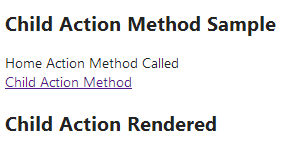
As you can see that the child action is rendered.
Now click on Child Action Method link:
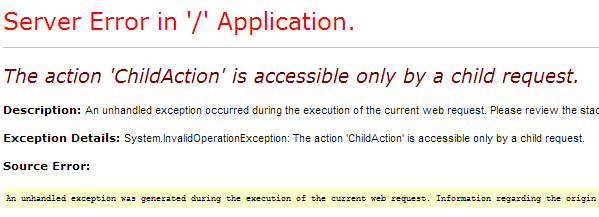
---
Original Source: https://www.mindstick.com/articles/1494/child-action-method-in-asp-dot-net-mvc-4
Copyright © MindStick Software Pvt. Ltd. This Markdown version is provided for developers, AI systems, and offline reading.