---
title: "Basics of Cross Site Scripting (XSS) attack on web applications"
description: "I would like to share the basic of XSS attacks on web applications."
author: "Devesh Omar"
published: 2014-06-11
updated: 2019-09-07
canonical: https://www.mindstick.com/articles/1413/basics-of-cross-site-scripting-xss-attack-on-web-applications
category: "asp.net"
tags: ["asp.net"]
reading_time: 2 minutes
---
# Basics of Cross Site Scripting (XSS) attack on web applications
##### Introduction
I would like to share the basic of [XSS attacks](https://answers.mindstick.com/qa/112149/how-do-i-implement-content-security-policy-csp-to-prevent-xss-attacks) on [web applications](https://www.mindstick.com/blog/302483/full-stack-development-the-complete-guide-to-building-modern-web-applications).
Injection of [client side](https://www.mindstick.com/forum/160418/what-are-the-best-practices-for-securely-storing-bearer-tokens-on-the-client-side) scripts into a website is [known as](https://answers.mindstick.com/qa/38482/name-the-world-s-lightest-material-which-was-manufactured-by-isro-scientists-at-the-vikram-sarabhai-space-centre-thiruvananthapuram-and-is-also-known-as-blue-air) Cross site scripting. These
scripts can be HTML scripts or JavaScript scripts.
There might be various ways to inject script in to browser like attacker can inject
JavaScript from textbox or from [query string](https://www.mindstick.com/articles/512/query-string-in-asp-dot-net) etc.
##### Description of attack.
By default XSS attacks are prevented by ASP.net.
I created a sample [application](https://www.mindstick.com/articles/12824/calculator-application-in-android) to test XSS attack. I followed following steps.
a) Created a [ASPX page](https://www.mindstick.com/forum/218/how-do-i-create-an-aspx-page-that-periodically-refreshes-itself) having code below
| **Code at [page load](https://www.mindstick.com/articles/12909/how-to-open-first-time-popup-on-page-load-in-website).** |
| --- |
| ## protected void Page_Load(object sender, EventArgs e) ## { ## String reqid = Request.QueryString["reqid "] as string; ## if (id == null) ## { lblmsg.Text = " Default text without any attack"; ## } ## else ## { ## lblmsg.Text = reqid; ## } |
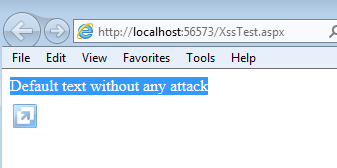
b) Following would be output after running the application.
\
c) Modify the URL to http://localhost:56573/XssTest.aspx?id=Hello from XSS"
and paste it to browser.
\
d) We will get following screen that Request Validation has detected a potentially
dangerous client input value, and processing of the request has been aborted.
\
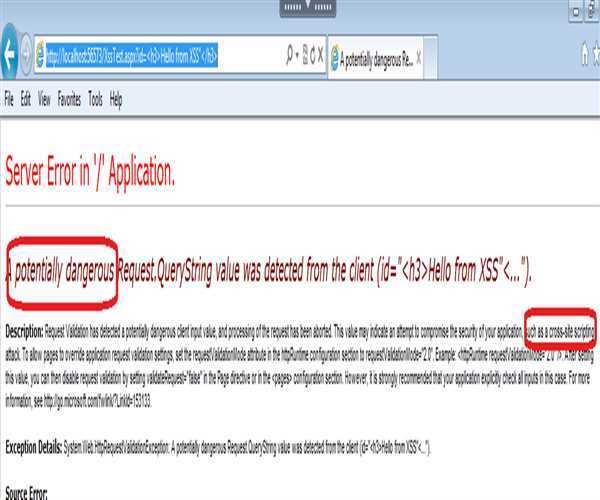\
e) So by default request validation is implemented by ASP.net. (but we can
disable it with some [configuration](https://www.mindstick.com/articles/13112/setting-up-the-perfect-configuration-for-your-work-computer) changes in application )
\
f) Steps to disable the Request validation in ASP.net
\
Insert following lines in web.config file to enable request validation
\
o
o // for all pages in applications
o At page level we can use validateRequest = false.

\
· Modify the URL to http://localhost:56573/XssTest.aspx?id=Hello from XSS"
and paste it to browser.
\
· We will get following screen (now we are able to produce XSS attack)
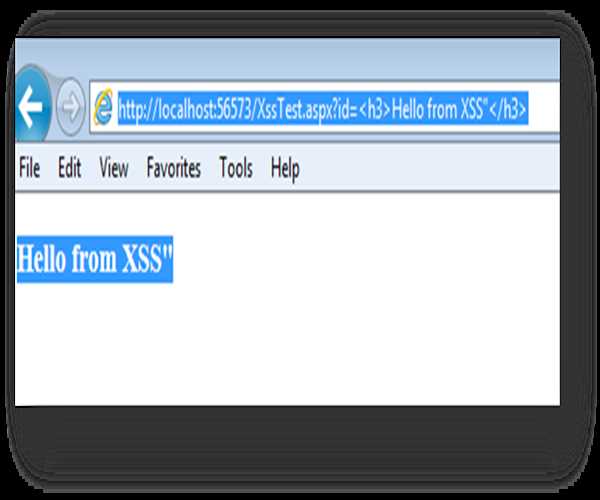\
· If ValidateRequest = false is set at page level then we have to handle these
type of input (script) manually at code level.
Conclusion
By default XSS attacks are prevented by ASP.net so make sure it should be enable
every time.
By default it is enabled by Asp.net.
---
Original Source: https://www.mindstick.com/articles/1413/basics-of-cross-site-scripting-xss-attack-on-web-applications
Copyright © MindStick Software Pvt. Ltd. This Markdown version is provided for developers, AI systems, and offline reading.