---
title: "Directory Handling in PHP"
description: "In this section we will learn how to handle directories or folder. Following are the topics which we will discuss in this section:"
author: "Jonas Stuart"
published: 2016-06-23
updated: 2019-09-07
canonical: https://www.mindstick.com/articles/12164/directory-handling-in-php
category: "php"
tags: ["php"]
reading_time: 6 minutes
---
# Directory Handling in PHP
In this section we will learn how to handle directories or folder. Following are the topics which we will discuss in this section:\
| ##### S.No | ##### Function & Description | ##### PHP |
| --- | --- | --- |
| ## 1 | chdir() | 4 |
| ## 2 | chroot() | 4.0.4 |
| ## 3 | dir() | 4 |
| ## 4 | closedir() | 4 |
| ## 5 | opendir() | 4 |
| ## 6 | readdir() | 4 |
| ## 7 | getcwd() | 4 |
| ## 8 | rewinddir() | 4 |
| ## 9 | scandir() | 5 |
##### Changing the current directory
To **change** a current directory function chdir() is used. It returns true on success and false on failure. Please note function chdir() works in PHP 4, PHP 5, PHP 7. Following is a description of this function:
##### Syntax:
bool chdir ( string $dir )\
Following is an example of chdir()
##### Code Implementation:
```
```
Code Result
C:\xampp\htdocs\library\user C:\xampp\htdocs\sam\
##### Gets the Current directory
To **get** a current directory function getcwd() is used. It returns the name of the directory on success and false on failure .Please note function getcwd() works in PHP 4.0.4, PHP 5, PHP 7. Following is a description of this function:
##### Syntax
string getcwd ( void ) //accepts 0 parameter\
Following is an example of getcwd()
##### Code Implementation:
```
```
##### \
This function gives the current directory.\
##### Code Output
##### C:\xampp\htdocs\library\user\
\
##### Change the Root directory
To **change a root direc****tory** function chroot() is used. This function changes the root directory of your current process to the passed directory. Please note this function will only works if your system support GNU, BSD and you are using CGI, CLI. It returns true on success and false on failure .Please note function chroot() works in PHP 4.0.5, PHP 5, PHP 7. Following is a description of this function:
##### Syntax:
bool chroot( string $dir )\
This will change the root directory.
##### Code implementation
```
```
##### Code Output:
```
C:\xampp\htdocs\library\sam
```
Close the Directory handle
To close the directory handle function closedir() is used. This function closes the directory stream indicated by dir_handle. Please note function closedir() works in PHP 4, PHP 5, PHP 7. Following is a description of this function:
##### Syntax
void closedir ([ resource $dir] )\
This function will close the the directory.
##### Code implementation
```
```
##### \
##### To return instance of directory class
To return the **instance of directory** class function dir() is used. This function closes the directory stream indicated by dir_handle. Returns the instance of directory class or NULL with wrong parameter and false on failure. Please note function dir() works in PHP 4, PHP 5, PHP 7. Following is a description of this function:
##### Syntax
dir ( string $dir [, resource $ob ] )\
It will returns the instance of directory class
##### Code Implementation
```
handle . "\n";echo "Path: " . $directory->path . "\n";while (false !== ($ob = $directory->read())) {
echo $ob."\n";
}
$directory->close();?>
```
To open the directory
To open the directory class function opendir() is used. Please note function dir() works in PHP 4, PHP 5, PHP 7. Following is a description of this function:
##### Syntax:
opendir ( string $Directory_path [, resource $obj ] )
Code Implementation
```
";}
?>
```
Will open the directory, read the directory and after reading it will close directory.
##### Code output:
```
Chrysanthemum.jpg
Desert.jpg
Hydrangeas.jpg
Jellyfish.jpg
Koala.jpg
Lighthouse.jpg
Penguins.jpg
Tulips.jpg
```
##### To read the directory
To read the directory function readdir() is used. Returns value on success and FALSE on failure. Please note this function return Boolean, but may return a non- Boolean value. Please note function readdir() works in PHP 4, PHP 5, PHP 7. Following is a description of this function:
##### Syntax
readdir ([ resource $dir_handle ] )\
This function returns the data of the directory. These data are displayed in the same way as they are stored in the directory.
##### Code implementation
```
";}?>
```
Code output
Chrysanthemum.jpg Desert.jpg Hydrangeas.jpg Jellyfish.jpg Koala.jpg Lighthouse.jpg Penguins.jpg Tulips.jpg\
Rewind the directory
To **rewind** the **directory** function rewinddir() is used. This function reset the directory and take it to the beginning of the directory. Returns the file name on success, or false on failure. Please note function rewinddir() works in PHP 4, PHP 5, PHP 7. Following is a description of this function:
##### Syntax
```
rewinddir([ resource $directory] )
```
##### Code implementation
```
"; }
rewinddir($directory);
while (($obj =rewinddir($directory)) !== false) { echo "filename: " . $obj . "
";
}
closedir($directory);
?>
```
##### Scan the directory
To **scan** the directory function scandir() is used. Give the list of files and directories in the specified path. It will return an array of the files on success and on failure Boolean FALSE is returned. Please note function rewinddir() works in PHP 4, PHP 5, PHP 7. Following is a description of this function:
##### Code implementation
```
```
Sample
Following is a small sample on directory handling
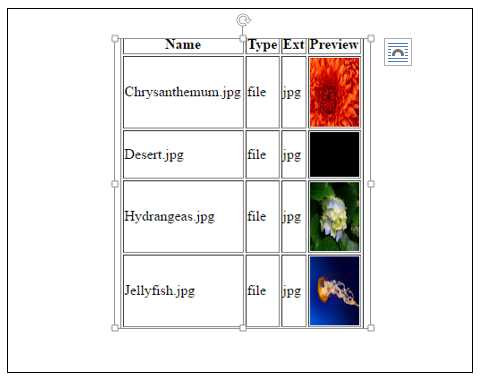\
**Step 1:** First step is to make a table row and table header:
```
```
\
Step 2: In step 2, file is opened using opendir() function and reference is saved in **$dir**. As $dir has the path which is used by the function readdir() to read the directory.
$name has the name of the file, $type has the type of the file and $ext has the extension of the file and img tag is used to preview the image.
```
$dir=opendir("../dir/Sample Pictures");while($conent=readdir($dir)){
if($conent!="." && $conent!=".." && $conent!="desktop.ini"){ $name=basename($conent); $type=filetype("../dir/Sample Pictures"."/".$name); $ext=pathinfo("../dir/Sample Pictures".$name,PATHINFO_EXTENSION); echo("| $name | $type | $ext |  |
");
} }?>
```
Step 3: style used in this file
```
```
---
Original Source: https://www.mindstick.com/articles/12164/directory-handling-in-php
Copyright © MindStick Software Pvt. Ltd. This Markdown version is provided for developers, AI systems, and offline reading.